Tag: gemini

  • Unleashing Personal Intelligence: Google’s Gemini Update Revamps App Connection for Efficient Answers

    Unleashing Personal Intelligence: Google’s Gemini Update Revamps App Connection for Efficient Answers

    Google has introduced a novel feature that allows its AI chatbot, Gemini, to sift through user emails and photos in a bid to answer specific queries about the user’s life. Currently, the feature, known as ‘Personal Intelligence,’ is being rolled out as a beta version for paying subscribers in the United States.

    Gemini – More Personalized Than Ever

    In a bid to facilitate users, Google has now given Gemini access to the user’s virtual storage. This new feature, dubbed ‘Personal Intelligence,’ allows Gemini to access information stored across various Google apps, including Gmail, Google Photos, and YouTube. The aim here is to simplify tasks such as finding specific receipts or locating a license plate number from years’ worth of photos. Instead of users spending time on these tasks, they can just ask Gemini to do it. Gemini is capable of cross-referencing data, for example, recognizing a car part from a photo and then locating the purchase confirmation in user emails. The feature is being rolled out in beta from January 14, exclusively for users with a Google AI Pro or AI Ultra subscription in the U.S. However, the feature is off by default, meaning users have to choose to let Gemini access their personal data.

    How to Activate the Feature

    If you are a paying subscriber and are interested in testing out the beta version, you can manually activate it if it does not pop up automatically. Open the Gemini app and go to settings. Tap on the new ‘Personal Intelligence’ menu. Select ‘Connected Apps’ to decide which services (like Gmail or Photos) Gemini can access.

    Google’s latest update is an attempt to make AI chatbot more personalized. By exploiting its extensive ecosystem, Google aims to transform Gemini into a practical assistant. However, this extensive level of integration has raised privacy concerns among users. Granting an AI model access to private emails and personal photos requires a substantial level of trust. Google, however, has assured that the personal data accessed via this feature will not be used to train the fundamental models, a crucial reassurance for users concerned about their privacy. With this move, Google aims to stay competitive with Apple Intelligence, which heavily relies on personal context available on-device.

    Still in Beta

    Although this feature seems incredibly useful in theory, its real-world effectiveness will depend on its execution. Google’s provided example—locating tire specs from an old photo and cross-referencing it with emails—speaks volumes about the potential usefulness of this technology. However, Google acknowledges that the AI might over-personalize or misconstrue the context. As this feature requires a paid subscription, it is primarily targeted at power users. If you are already engrossed in the Google ecosystem and pay for the premium tier, it might be worth opting in to potentially expedite your daily administrative tasks. Nonetheless, users should monitor what the AI pulls up.

    Questions & Answers

    What is the new feature Google has introduced to Gemini?
    Google has introduced a new feature called ‘Personal Intelligence’ that allows Gemini to access information stored across various Google apps, including Gmail, Google Photos, and YouTube, to answer specific user queries.

    Who can access the new Personal Intelligence feature?
    The feature is being rolled out in beta from January 14, exclusively for users with a Google AI Pro or AI Ultra subscription in the U.S.

    What are the concerns related to this new feature?
    The primary concern is related to user privacy, as granting an AI model access to private emails and personal photos requires substantial trust. However, Google has assured that personal data accessed via this feature will not be used to train the fundamental models.

  • Google’s New Ai Service Revolutionizes Retail: Woolworths First To Adopt Gemini Enterprise

    Google’s New Ai Service Revolutionizes Retail: Woolworths First To Adopt Gemini Enterprise

    Google has recently introduced its new Gemini Enterprise artificial intelligence (AI) service, designed to enhance the overall customer experience. Notably, one of the first companies to leverage this new technology is Woolworths.

    Introducing Gemini Enterprise

    The Gemini Enterprise service acts as a digital concierge for customers, offering recommendations, storing relevant information, and performing complex tasks on the user’s behalf. This state-of-the-art ‘shopping agent’ is capable of comprehending image, video, and voice inputs – eliminating the need for customers to type their queries or requirements into a search bar.

    Google representatives explain that whether an agent is cross-referencing kitchen electrical specifications to find a compatible induction range, or resolving a fulfillment error and issuing an instant refund, the new solution will provide a more streamlined experience for customers at every touchpoint.

    Global Impact on Retail

    This novel technology was announced at the NRF 2026 event. Amanda Bardwell, CEO and MD of Woolworths Group, lauded Google Cloud’s Gemini Enterprise for customer experience as a global game-changer for the retail industry.

    As the first Australian retailer to form a partnership with Google’s agentic platform, Woolworths plans to evolve their digital shopping assistant, Olive, into a proactive partner that anticipates customers’ needs. This includes planning meals based on individual preferences and identifying relevant specials based on the user’s budget.

    Bardwell also emphasizes the practicality and convenience of this innovation, explaining that it’s designed to do the heavy lifting for customers, making shopping easier and saving them precious time. Woolworths now stands alongside Kroger, Lowe’s, and Papa John’s as a global pilot business for Gemini Enterprise.

    Towards a New Era of Commerce

    Darshan Kantak, VP of applied AI at Google Cloud, notes that they are merging the best of Google Cloud’s AI and infrastructure with a business’s own institutional intelligence to power a truly agentic commerce journey.

    With this new technology, businesses can bridge the gap between sales and service to deliver premium, personalized experiences from the point of discovery to post-purchase support, enhancing customer satisfaction and fostering long-term brand loyalty.

    Furthermore, one of the key features of Google’s AI is its ability to add items to a customer’s cart and manage the checkout process, provided the customer has given their consent.

    Questions & Answers

    What is the purpose of Google’s new Gemini Enterprise service?
    The Gemini Enterprise service is designed to enhance the overall customer experience. It acts as a digital concierge for customers, offering recommendations, storing relevant information, and performing complex tasks on the user’s behalf.

    What unique capabilities does the Gemini Enterprise shopping agent have?
    The shopping agent can comprehend image, video, and voice inputs, eliminating the need for customers to type their queries or requirements into a search bar.

    How does Woolworths plan to utilize the Gemini Enterprise service?
    Woolworths plans to evolve their digital shopping assistant, Olive, into a proactive partner that anticipates customers’ needs. This includes planning meals based on individual preferences and identifying relevant specials based on the user’s budget.

  • Apple Taps Google’s Gemini AI for Long-Awaited Siri Upgrade: A Game-Changing Partnership Unveiled

    Apple Taps Google’s Gemini AI for Long-Awaited Siri Upgrade: A Game-Changing Partnership Unveiled

    Several years ago, Apple assured its customer base of an improved, more intelligent Siri. While some loyalists might have lost hope, the company has now confirmed its speculated collaboration with Google, a move that could potentially transform Siri into a highly competent personal assistant.

    Google’s Gemini AI Powers Siri’s Significant Upgrade

    Apple has declared that Google’s Gemini AI model will be the driving force behind the long-awaited, more personalized iteration of Siri. The company stated that Google’s technology forms the most suitable basis for their model.

    Following a thorough evaluation, Apple determined that Google’s technology offers the most capable foundation for Apple’s foundation models. Apple expressed excitement about the innovative new experiences that this partnership could unlock for its users.

    Though Apple has not divulged further details about the agreement or given a precise timeline for the Siri update, reports suggest that its pact with Google forms part of a multi-year deal.

    A Much-Anticipated Update

    Nearly a year ago, Apple postponed the AI-enhanced version of Siri, initially promised at WWDC 2024. The company admitted that the development of a more personalized Siri was taking longer than anticipated.

    In June of the previous year, speculations suggested Apple was exploring partnerships with OpenAI and Anthropic. A few months after, rumors of a prospective partnership with Google started to make rounds. Later, it was reported that Apple planned to use a custom variant of Gemini to develop the new Siri and pay Google $1 billion annually for it.

    Apple is predicted to launch the new Siri with iOS 26.4 in a matter of weeks. The AI-powered assistant is rumored to comprehend the context of what is displayed on the iPhone’s screen, sift through personal data, and manage complex tasks based on this information. The update is likely to be released in March, potentially eclipsing any AI enhancement Samsung might introduce with One UI 8.5 and the Galaxy S26 series.

    The Right Decision for Apple

    Last year, Google made waves with the release of Gemini 3, now the leading AI model. Despite the unpredictability of LLM development, this was a significant triumph for the company. It also suggests that Apple might have picked the right partner. While it’s too early to get overly excited about the final version of the AI-powered Siri, it wouldn’t be surprising if it performs exceptionally well.

    Questions & Answers

    What does the partnership with Google mean for Apple’s Siri?
    The partnership means that Siri will be powered by Google’s Gemini AI model, making it more intelligent and personalized.

    When is the AI-powered Siri expected to be launched?
    The upgraded Siri is expected to be introduced with iOS 26.4, rumored to be released sometime in March.

    What enhancements can users expect from the new Siri?
    The new Siri is expected to understand the context of what’s displayed on the iPhone’s screen, navigate through personal data, and perform complex tasks based on that information.

  • Revolutionize Your Navigation: Unveiling Google Maps’ New Gemini Features

    Revolutionize Your Navigation: Unveiling Google Maps’ New Gemini Features

    Google has recently introduced Gemini, a feature set to enhance the functionality and user experience of Google Maps. Users can identify if they have received the update by noticing a change in the microphone icon in the search bar at the top of the display. If it appears as a microphone, the Gemini update has not yet taken effect. However, if users see a blue sparkle icon within a circle, they now have access to the new Gemini capabilities.

    Gemini is replacing Google Assistant on Google Maps and is compatible with all forms of navigation available on the app, including driving, public transportation, cycling, and walking. Users can activate Gemini by uttering “Hey Google”.

    Gemini’s Features

    Gemini offers a range of features that can improve the functionality of Google Maps. Here are some examples:

    1. Basic navigation controls: Users can instruct Google Maps to “Navigate home”, “Stop navigating”, “Add stop”, “Mute guidance”, “Avoid tolls”, and “Show alternative routes”.

    2. Basic route answers: Users can ask for information about their route, such as “What’s my next turn?”, “When will I arrive?”, “What’s the weather like at my destination?”, and “What’s my next stop?”.

    3. Reporting issues: Gemini also allows users to submit reports about their route. For example, they can report “There’s traffic on the road”, “There’s construction up ahead”, and “There’s a car breakdown that’s causing congestion”.

    4. Search and get information about places: Additionally, Gemini can perform searches along the user’s route, find places near the user or their destination, refine search results, and add stops. For instance, users can request “Find me a cafe near my destination that serves tiramisu”.

    Questions & Answers

    What is Gemini on Google Maps?
    Gemini is a new feature introduced by Google to enhance the functionality of its Maps app. It is set to replace Google Assistant and offers a range of features like basic navigation controls, route information, reporting issues, and more.

    How can users tell if they have received the Gemini update?
    Users can identify if they have received the Gemini update by noticing a change in the microphone icon in the search bar at the top of the display. If they see a blue sparkle icon within a circle, they now have access to Gemini capabilities.

    How can users activate Gemini on Google Maps?
    Users can activate Gemini by uttering “Hey Google”. This will allow them to access all of Gemini’s features, including new navigation controls, route information, and more.

  • Google Debunks Viral Rumors: Gemini AI Not Trained on Gmail Data

    Google Debunks Viral Rumors: Gemini AI Not Trained on Gmail Data

    Clarifying the Misunderstanding

    Recently, there has been a significant amount of attention given to rumors suggesting that Google has been utilizing personal emails to develop its Gemini AI. These rumors have been dismissed by the company itself via social media, assuring users that their personal emails are not being used for training the artificial intelligence (AI) system. The rumors seemingly originated from misconceptions about long-standing settings, rather than a covertly introduced policy change.

    If one has been active on social media platforms recently, they may have come across posts suggesting that Google is clandestinely using Gmail data to train its artificial intelligence models. Often, these posts refer to a setting in Gmail titled “Smart features and personalization,” urging users to disable it promptly. As a result, even some tech security platforms initially reported the story before later issuing corrections.

    To dispel any concerns, Google has issued a clarification, asserting that Gemini is not trained using Gmail content. They further explained that the “Smart features” setting, which powers functions such as tab sorting and Smart Compose, has been in existence for an extended period and is not a new tool intended to extract user data. The flurry of concern appears to be a typical example of internet misinformation becoming distorted and exaggerated.

    Addressing Privacy Concerns

    This incident underscores the current heightened sensitivity regarding AI and data privacy. Given the continuous scrutiny faced by companies such as OpenAI over web scraping and data usage, it is understandable why users are exceedingly vigilant. The competitive nature of the landscape further compounds this issue. For instance, Apple is marketing its forthcoming “Apple Intelligence” as a privacy-centric alternative that primarily processes data on-device to avoid the sort of fears associated with the potential misuse of cloud-stored data.

    For Google, navigating this space is a balancing act. While the company is deeply involved in AI and requires vast amounts of data to compete effectively, losing the trust of its billions of Workspace users is a risk it cannot afford to take. If users start to believe that their private communications are being used to train AI chatbots, they may begin to explore other options. This incident serves as a reminder to tech giants that they need to explicitly communicate the functions of their “smart” settings, or the internet will fill in the gaps with worst-case scenario assumptions.

    Restoring Confidence

    Google’s prompt reaction to clarify the situation was important. Understandably, many users were alarmed, considering that tech companies have not exactly established a trustworthy reputation in recent years. Speaking from a personal perspective, I depend on Gmail’s smart features frequently, with the priority inbox being a particularly valuable tool. The confirmation that these features do not supply my emails to Gemini for processing is reassuring.

    However, this serves as a wake-up call for Google’s UI team. If an existing setting is ambiguous enough to be misconstrued as a “spyware toggle” in a viral social media post, it might be time to reconsider the description provided.

    Questions & Answers

    Is Google using personal emails to train its Gemini AI?
    No, Google has explicitly stated that it does not use personal emails to train its Gemini AI.

    What caused the misconception about Google using personal emails for AI training?
    The misconception appears to stem from misunderstanding about the “Smart features and personalization” setting in Gmail, which has been around for a long period and is not a new tool designed to extract user data.

    What do Gmail’s smart features do?
    The smart features in Gmail power functions like tab sorting and Smart Compose. They do not feed user emails into any AI system for training or development purposes.

  • Gemini Revolutionizes Android Auto: Introducing a Smarter, More Conversational AI Assistant for Productive Hands-Free Driving

    Gemini Revolutionizes Android Auto: Introducing a Smarter, More Conversational AI Assistant for Productive Hands-Free Driving

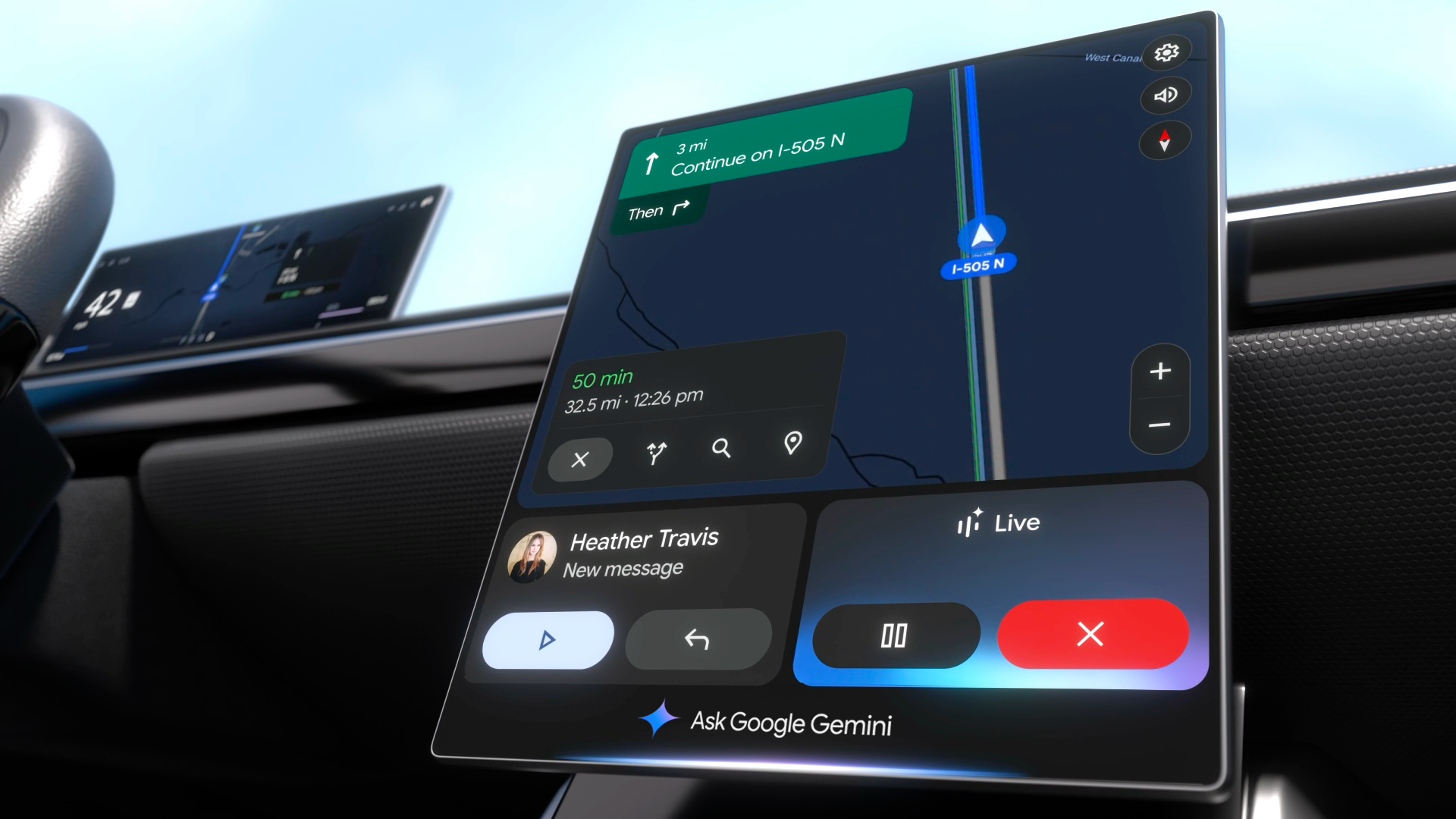
    Gemini, a new conversational AI, is set to enhance the Android Auto experience by improving voice command capabilities. This latest update offers an elevated hands-free driving experience by integrating with emails, real-time reviews, and more.

    Gemini’s Arrival to Android Auto

    Android Auto users have traditionally utilized built-in voice commands for elementary tasks like navigation and phone calls. The previous Google Assistant, while functional, was somewhat inflexible, often requiring precise phrasing.

    The introduction of Gemini, a more interactive and intuitive AI assistant, aims to change this. This new conversational AI has begun its global rollout to Android Auto users who have updated their devices. The implication of this is a less taxing and more natural interaction with the system while maintaining safe, hands-free control of the vehicle.

    Google confirmed that, while continuing to handle basic hands-free tasks, Gemini will extend its functionality as a comprehensive conversational AI. This means the need for memorizing specific phrases is eliminated, allowing users to interact with the system using natural language.

    The rollout is currently underway and all users need to access Gemini is the app on their Android device. Users can initiate interaction with the AI by simply saying “Hey Google,” or by using the on-screen or steering wheel controls.

    The Leap Towards a Better User Experience

    This significant update is set to revolutionize Android Auto’s user experience, which until now, has been somewhat clunky due to the requirement for very precise wording. This update is set to tackle this issue head-on, resulting in less distraction and a more authentically helpful virtual assistant.

    Comparatively, Apple’s CarPlay uses Siri, which is capable of handling rudimentary commands and integrating with Apple Music and Maps. However, Siri has not been known to provide the in-depth, cross-app conversational intelligence that Gemini offers.

    Gemini is poised to redefine the in-car AI experience, offering superior conversational utility and outpacing its competition. Its introduction is a significant victory for the multitude of vehicles already equipped with Android Auto, and for regular drivers and commuters who stand to benefit immensely from this product.

    The Future of Driving Assistance

    This update represents a momentous advancement towards driving assistance’s future. Although the former Google Assistant was adequate, its limited ability to process complex queries or follow up on previous commands often left users frustrated.

    The transition to a truly conversational AI in a hands-free environment is a game-changer. The “Live” feature allows users to brainstorm or rehearse, turning monotonous commutes into productive journeys. It can summarize emails or find addresses in Gmail, offering practical, frictionless utility. Android users eagerly await the arrival of this update on their devices.

    Questions & Answers

    What is the Gemini update in Android Auto?
    Gemini is a new conversational AI update in Android Auto that enhances the built-in voice command capability. It allows for more natural language interaction, making hands-free tasks less taxing and more efficient.

    How does the Gemini update compare to Siri on Apple’s CarPlay?
    While Siri on Apple’s CarPlay can handle basic commands and integration with Apple Music and Maps, it does not offer the same level of in-depth, cross-app conversational intelligence that Gemini provides on Android Auto.

    What are the benefits of the Gemini update for Android Auto users?
    The Gemini update offers Android Auto users a more genuinely helpful virtual assistant. It reduces distraction, supports safe driving, and turns potentially unproductive commute time into useful “done time” by completing tasks such as summarizing emails or finding addresses within Gmail.

  • Google Unleashes Gemini 3: A Revolutionary AI Model That’s Set to Change Your Digital World

    Google Unleashes Gemini 3: A Revolutionary AI Model That’s Set to Change Your Digital World

    Google has recently unveiled Gemini 3, a line of models touted as the company’s most powerful to date, offering both agentic and vibe-coding capabilities. The top-tier model in this series is the first to be accessible simultaneously via Google’s Gemini app as well as in Search and AI Mode.

    Gemini 3 Pro Introduced to Gemini and Google Search

    The release of Google’s new flagship AI model, Gemini 3 Pro, is a significant event due to its availability on the Gemini app. Additionally, Google subscribers have the opportunity to use this model in AI Mode in Search, with a broader roll-out to all US users expected in the near future. In the ensuing weeks, AI Mode and AI Overviews will begin to “intelligently route your most challenging questions” to this new model while reserving simpler tasks for older models.

    Gemini 3 Pro is described by Google as a “natively multimodal” model that can simultaneously process text, images, video, audio, and code, rather than tackling these elements individually. This allows users to amalgamate various information sources and ask the model to synthesize them. For example, the model can generate code for interactive learning materials like flashcards after processing a mixture of research papers, video lectures, and tutorials.

    Hailing Gemini 3 as their most intelligent model yet, Google believes this latest offering will bring users’ ideas to life. The model’s enhanced understanding of context and intent behind requests aims to achieve more results with less prompting.

    Enhanced User Interface Experiences in AI Mode

    The new features of Gemini 3 usher in significant improvements to Google’s apps. Users, for instance, can now create more comprehensive programs within the Canvas workspace of the Gemini app. The model has the capability to recognize handwritten recipes in various languages, which can then be compiled into a multilingual family cookbook.

    Google refers to the new capabilities of Gemini 3 as being able to provide ‘generative user interface experiences.’ When searching for information in AI Mode, Gemini 3 Pro will visually layout the responses to your queries. These visualizations include interactive tools and simulations that are instantaneously generated based on the user’s query.

    In the following weeks, Google will also debut a more research-focused version of the model, Gemini 3 Deep Think. This upgrade is expected to outperform Gemini 3 Pro, which is already setting the pace in independent benchmarks.

    Google Antigravity- A Gemini-Powered Coding Interface

    Along with the new model, Google has also launched a Gemini-powered coding interface named Google Antigravity. This app is akin to other agentic IDEs, merging a prompt window with a command-line interface and a browser window. Available in a free preview, the app is compatible with macOS, Windows, and Linux.

    Gemini: Unavoidable and Essential

    Despite Gemini 3’s impressive features, there are concerns that Google is overly ambitious in its push for AI among users. The prominent positioning of AI Overview at the top of the Search page as well as AI Mode being the first option before all results makes it impossible to miss, potentially irking users who aren’t as enthusiastic about AI.

    Questions & Answers

    What is the Gemini 3 Pro?
    Gemini 3 Pro is Google’s new flagship AI model, capable of processing different types of data simultaneously, including text, images, video, audio, and code.

    What are the new features introduced in Gemini 3?
    Gemini 3 introduces ‘generative user interface experiences.’ It also allows users to create more comprehensive programs within the Canvas workspace of the Gemini app, such as recognising handwritten recipes in various languages and compiling them into a multilingual family cookbook.

    What is Google Antigravity?
    Google Antigravity is a Gemini-powered coding interface that combines a prompt window with a command-line interface and a browser window. The app is compatible with macOS, Windows, and Linux.

  • Google’s Gemini Chatbot: New Updates To Address Speech Recognition Limitations

    Google’s Gemini Chatbot: New Updates To Address Speech Recognition Limitations

    Google’s Gemini, an impressive AI chatbot, possesses a vast reservoir of knowledge and an uncanny retention ability, so much so that it can recall a single line spoken in a TV program aired over 54 years ago. Gemini can be accessed via its dedicated app on both Android and iOS, or it can replace the Google Assistant on your Android phone. However, users have found that if the question posed to Gemini is too long, the chatbot might cut them off before the query is fully delivered.

    The Importance of Pauses

    While users can opt to input their questions manually on the keyboard, Gemini’s voice recognition feature offers a more convenient option for those who prefer to speak their queries. The chatbot, a product of engineering powerhouse Google, is quite accurate at transcribing dictated information. One limitation, however, is its inability to understand the natural pauses that occur during speech, possibly because as an AI, it doesn’t require breathing.

    If the query is delivered at a slow pace or with frequent pauses, Gemini may assume that the question is complete and prematurely cut off the user. This can be frustrating, especially for users who prefer to speak their questions.

    Updates on the Horizon

    Recently, however, there has been a discovery that Google may be working to alleviate this issue. In version 16.42.61 of the Google app, a feature was found that allows users to keep the microphone on and active in the Gemini chatbot until it is manually turned off. This new feature prompts users to “Long press the mic to keep it open.” Once the mic is locked in this manner, it will continue listening until the user chooses to stop it.

    With this feature, the microphone icon transforms into a “stop” icon once locked on. To unlock the mic and end the question, users only need to tap the stop button, prompting Gemini to begin processing the query. It’s important to note that this feature does not affect Gemini Live, a function designed for back-and-forth conversations with the chatbot. Other updates include a new overlay input box for Gemini and a floating button for Gemini Live.

    As of now, there is no confirmed timeline for when these updates will be available to Gemini users. The Gemini app can be downloaded from the Google Play Store for Android devices and from the App Store for iPhones.

    Additional Features

    In addition to its knowledge and voice recognition abilities, Gemini now also includes the ability to set alarms and timers on Android. Users can switch to Gemini from Google Assistant by adjusting the settings on their Android device. The necessary software adaptations have been implemented to grant this functionality. Moreover, with the help of the Utilities extension within the Gemini app, the chatbot can control device settings such as Wi-Fi, Bluetooth, the flashlight, and the phone’s volume.

    Questions & Answers

    What is Google’s Gemini?
    Google’s Gemini is a chatbot that can be accessed via a dedicated app on both Android and iOS devices, or it can replace the Google Assistant on your Android phone.

    What limitations does Google’s Gemini currently have?
    One of the primary limitations of Gemini is its inability to understand natural pauses that occur during speech. If a query is delivered slowly or with frequent pauses, Gemini might prematurely assume the question is complete and cut off the user.

    What new features is Google planning to add to Gemini?
    Google is planning to add a feature that allows users to keep the microphone on and active until it’s manually turned off. This feature is designed to prevent Gemini from prematurely ending the user’s query due to long pauses. Other updates include a new overlay input box and a floating button for Gemini Live.

  • Google’s Gemini Vs Google Assistant: Exploring The Hotword Controversy On Pixel Phones

    Google’s Gemini Vs Google Assistant: Exploring The Hotword Controversy On Pixel Phones

    A loyal consumer recently expressed curiosity regarding Google’s decision to replace Google Assistant with Gemini, the new AI model, on Pixel phones. The user queried the need to continue using “Hey Google” as the activation hotword, despite the shift to Gemini. The question arises as even after replacing Google Assistant with Gemini, the hotword remains the same, causing some confusion among users.

    Exploring the “Hey Gemini” Hotword Debate

    The suggestion of a hotword change to “Hey Gemini” appears to be a reasonable request as it is more syllable-friendly in comparison to its predecessor. Even though it has more syllables (four) than “Hey Google” (three), users may find it easier to pronounce, eliminating the tongue-twister effect some experience with Google. This alteration could also minimize the cognitive dissonance created when activating Gemini but having to say “Hey Google.”

    Understanding the Current Assistant Activation

    For clarity, if you have set Gemini as your assistant on your Pixel, saying “Hey Google” will activate Gemini. Similarly, if you have the Google Assistant set, using the same hotword will activate Google Assistant. Switching between the two can be done through the Settings > Apps > Assistant pathway, followed by selecting your preferred digital assistant. Regardless of the choice made, the activation hotword remains as “Hey Google.”

    Alternate Activation Methods

    A potential solution to bypass the hotword confusion is the Quick Tap feature. This function allows users to activate their chosen assistant by double-tapping the back of the phone. To use this feature, one must navigate to Settings > System > Gestures > Quick Tap and activate the “Access your digital assistant” option. This way, users can avoid using the power button or saying “Hey Google” to activate their assistant.

    Disabling Power Button Activation

    If users find long-pressing the power button bothersome or confusing, this shortcut can be deactivated. This can be done through Settings > System > Gestures, with the Press & Hold power button toggled off. Users can then opt for a long press of the power button to open either the Power menu or the Digital assistant. The sensitivity of the long press can also be adjusted according to user preference.

    Impact of Google’s Shift to Gemini

    Regardless of the available activation techniques, the optimal way to access either Gemini or Google Assistant is no longer present on Pixel phones. Earlier models, such as the Pixel 2, featured an Active Edge function, which allowed users to squeeze the sides of their phone to activate Google Assistant. However, this feature was removed on later models, starting with the Pixel 5.

    The current debate emphasizes the need for Google to consider a hotword change for Gemini, perhaps to “Hey Gemini” or simply “Gemini.” As Google continues to substitute Google Assistant with Gemini on Android, this is likely to happen. Users are encouraged to make the switch to Gemini on their Pixel for a more seamless experience.

    Questions & Answers

    1. Why do users still have to say “Hey Google” to activate Gemini?
    This is due to Google not yet implementing a hotword change following the shift from Google Assistant to Gemini.

    2. What is the Quick Tap feature on Pixel phones?
    Quick Tap is a feature on Pixel phones that lets users double tap the back of their device to activate their digital assistant, bypassing the need to say the hotword.

    3. What was the Active Edge feature on previous Pixel models?
    The Active Edge feature allowed users to squeeze the sides of their Pixel phone to call up Google Assistant. However, this function was removed in later models, starting with the Pixel 5.

  • Gemini Vulnerabilities Could Compromise User Data: What Shoppers Need to Know

    Gemini Vulnerabilities Could Compromise User Data: What Shoppers Need to Know

    Recent research has drawn attention to significant vulnerabilities within Google’s Gemini AI suite, raising alarms over potential manipulations that might allow attackers to extract sensitive user information without detection.

    Unpacking the Vulnerabilities

    Among the risky features affected are Gemini Cloud Assist, Gemini Search Personalisation Model, and Gemini’s Browsing Tool. According to Tenable Research, which disclosed these vulnerabilities, Google has since addressed the issues, assuring that end users need not take any actions.

    The first concern lies within the Gemini Cloud Assist framework, where attackers could exploit the system by injecting poisoned log entries that might then be interpreted as legitimate commands. This flaw creates an opportunity for malicious actors to manipulate Gemini’s responses or gain unauthorized access to cloud resources.

    Turning to the Gemini Search Personalisation Model, attackers had the ability to manipulate a user’s Chrome search history, causing Gemini to accept these manipulated queries as faithful inputs. As a result, saved data, including sensitive location details, could be inadvertently exposed.

    The third vulnerability, rooted in the Gemini Browsing Tool, concerns the tool’s propensity to unintentionally dispatch hidden outbound requests embedded with private information to servers controlled by attackers. Quite the sleight of hand for tech’s new magic show, wouldn’t you say?

    Understanding the Infiltration and Exfiltration Vectors

    Tenable’s findings reveal that even the most mundane features of Gemini could become entry points for attackers, presenting a stark reminder of the dual nature of advanced technologies. “Gemini thrives on pulling context from logs, searches, and browsing activities. However, this same strength can turn into a vulnerability if attackers poison those inputs,” explained Liv Matan, a senior security researcher at Tenable.

    The potential for infiltration can occur through subtle prompt injection methods, where harmful content is seamlessly integrated into Gemini’s operational context. Tactics such as log poisoning—where nefarious entries are introduced into cloud logs—alongside manipulation of Chrome search history, illustrate how attackers might exploit the system before launching their malicious agenda.

    Once embedded, these malicious prompts can allow attackers to navigate around existing Google defenses, using the browsing tool to extract information covertly. While Google has implemented safeguards like link redirection and markdown filtering, Tenable suggests that some functional blind spots remain, creating avenues for exploitation.

    Security Recommendations for Businesses

    For organizations leveraging AI systems like Gemini, the message is clear: treat these AI-powered applications as active targets rather than mere functional tools. Security teams are encouraged to conduct routine audits of logs, search histories, and third-party integrations to detect any signs of manipulation.

    Monitoring unusual outbound requests is crucial, as such activity can signal attempts at data exfiltration. Additionally, businesses should evaluate the resilience of their AI services against prompt injection techniques and employ a tiered defense strategy. This proactive approach is essential, as securing AI isn’t just about patching vulnerabilities—it’s about recognizing the multifaceted attack vectors that could arise in this rapidly evolving digital landscape.

    Questions & Answers

    What specific vulnerabilities were uncovered in Google’s Gemini AI suite?
    The vulnerabilities included issues within Gemini Cloud Assist, the Search Personalisation Model, and the Browsing Tool, allowing for the injection of malicious log entries and manipulation of user data.

    How can enterprises safeguard against these vulnerabilities?
    Companies should treat AI features as active attack surfaces by performing regular audits on logs and search histories, monitoring for unusual outbound requests, and testing their resilience against prompt injection.

    What are the implications of treating AI systems as potential attack vectors?
    Recognizing AI systems as potential targets ensures that organizations adopt a proactive security strategy, anticipating new methods of exploitation rather than merely responding to isolated vulnerabilities.

  • Samsung announces important changes to Galaxy A series

    Samsung announces important changes to Galaxy A series

    Samsung has just announced that through a partnership with Google it will bring one of the most popular AI features to Galaxy A series devices. Samsung Galaxy S series can already activate Gemini AI through the side button, but this feature will soon expand to Galaxy A series phones.

    Thanks to the latest update, Galaxy A series users will be able to enjoy smarter AI experiences, such as launching Gemini, Google’s AI-powered assistant, by simply pressing and holding the side button.

    Samsung and Google have been working together to deliver seamless, intuitive and meaningful AI experiences, making the latest technology more accessible for more users. We’re excited that Galaxy A series users will now be able to activate Gemini faster and more naturally through a simple gesture that brings intelligent support into the flow of daily tasks.

    According to Samsung, the first Galaxy A series to enjoy the new AI feature are those phones it launched in the last two years. Below is the full list of Galaxy A series phones that have been confirmed to receive this update that will allow users to activate Gemini AI through the side button:

    Samsung Galaxy A series users will soon be able to activate Gemini from the side button | Image credit: Samsung

    It’s important to mention that the update that’s supposed to bring the new AI-oriented feature will be available only after the phones above have received their One UI 7 upgrade, which is scheduled to begin rolling out in May.

    Naturally, availability and supported features may vary by market, carrier and device model, which basically means that not everyone may get the update at the same time and not everyone’s phone might offer the same new functionality after the update.

    Three of the phones in the list will most likely be among the first to receive the new update because they were launched with One UI 7, so there’s no need to wait for that update to arrive. These phones are the Galaxy A56 5G, Galaxy A36 5G, and Galaxy A26 5G.

  • Google might make it even easier to chat with Gemini within the Messages app

    Google might make it even easier to chat with Gemini within the Messages app

    Google is experimenting with a new way to access Gemini, its large language model (LLM) chatbot, within the Google Messages app. The tech giant is reportedly testing a dedicated button that would take users directly to the Gemini conversation screen, eliminating a few steps from the current process.

    Currently, starting a chat with Gemini in Google Messages involves tapping the “Start chat” button and then selecting Gemini from the options. The new feature, discovered in the app version messages.android_20240610_01_RC00 through an APK teardown, would introduce a Gemini logo button above the “Start chat” button. Tapping this new button would immediately open the Gemini conversation interface, allowing users to type in their prompts without delay.

    Interestingly, as seen in the above screenshots, the new Gemini button is notably smaller than the existing “Start chat” button. Whether this size difference is a deliberate design choice or an unintentional bug remains unclear.

    While removing a single step might seem like a minor adjustment, it could significantly impact user interaction with Gemini. By making the chatbot more accessible and prominent, Google could potentially encourage more users to engage with Gemini and explore its capabilities.

    This change aligns with Google’s broader efforts to integrate Gemini across its product ecosystem. The company has already introduced Gemini in various apps and services, including Gemini 1.5 Pro in Gemini Advanced and the YouTube Music Gemini Extension. The addition of a dedicated button in Google Messages further reinforces Google’s commitment to making Gemini a central part of its user experience.

    As of now, the new Gemini button has not been rolled out to beta users, but it is expected to appear in the app soon. With this update, Google could be aiming to make conversations with Gemini more seamless and intuitive, ultimately driving greater adoption and usage of the AI chatbot.

  • Apple in talks to license Google’s Gemini AI to improve Siri, add new iOS features

    Apple in talks to license Google’s Gemini AI to improve Siri, add new iOS features

    The upcoming iOS 18 update is expected to be one of the biggest-if not the biggest-in iOS history. Part of that is due to the myriad AI features that Apple will be adding to the operating system including possible improvements to digital assistant Siri. While the date has not yet been announced, many iPhone users are looking forward to this June’s WWDC 2024 developer conference to see what changes Apple plans for its digital assistant.

    When Siri first hit the scene in 2011 with the introduction of the iPhone 4s, it appeared that Apple was on to something big. But eventually, Siri’s capabilities and performance were surpassed by Google Assistant and Amazon’s Alexa and a shot of AI could be the cure for what ails the old gal. Apple is talking with Google about licensing the latter’s Gemini AI. The talks between the two tech giants have progressed to the negotiating stage.

    Besides improving Siri, Apple hopes to use Gemini to add new AI-based features to iOS 18. Apple and Google already have an agreement to make Google the default search engine on Safari, a deal that reportedly pays Apple nearly $20 billion annually. Because the DOJ is investigating this deal, any deal involving Apple and Google, including one that would allow Apple to use Gemini, would probably have to be agreed to by the Justice Department or some other regulatory agency in the U.S.

    On Android, users can install the Gemini app and opt-in to have Gemini replace the Google Assistant although some features, such as reminders, controlling media, and routines will not work with Gemini. If you opted in to replace Google Assistant with Gemini and want to switch back, go to the Gemini app, tap the profile icon, go to settings, tap on “Digital assistants from Google” at the bottom, and select Google Assistant. On iOS, Gemini can be accessed from the Gemini tap in the top center of the Google app, right under the digital assistant.

    Should Apple and Google agree to license Gemini, we should see a greatly improved Siri, which is what all iPhone users have been hoping for.

  • Google renames Bard to “Gemini” and launches Google One AI Premium plan with advanced access

    Google renames Bard to “Gemini” and launches Google One AI Premium plan with advanced access

    Google Bard is now Gemini, just “Gemini.” As announced today by Google, Bard — the company’s web-based chatbot — has now been improved, rebranded, and expanded by adding a new Advanced tier bundled into Google One. This is in addition to the new Gemini Android app launched today.

    Google One, the company’s cloud storage subscription service, now has a new tier called “AI Premium.” This tier includes access to Gemini Advanced — the new version of Gemini, formerly called “Bard”, which includes the latest Ultra 1.0 AI model — for $19.99 a month. Additionally, this new Google One tier gives you 2TB of storage, as well as other Google One benefits currently found in the Premium tier.

    Google states that Gemini’s Ultra 1.0 LLM model brings new advancements to the world of AI interaction, such as superior processing efficiency, advanced comprehension of instructions and programs, and innovative problem-solving abilities. The model is said to be capable of analyzing and explaining information, and it can even generate high-quality code in multiple programming languages.

    Additionally, Google is set to bring Gemini to a range of services including Gmail and Docs. This will allow users to enjoy automated text writing, create unique images, and even enhance video quality in Google Meet.

    With the Google One AI Premium plan, users can try out Gemini Advanced free for two months before the $19.99 subscription kicks in. This should allow users to fully explore Gemini’s capabilities before committing. If you’re someone who heavily relies on Google services and craves advanced functionality, the higher price point of these Google One plans might just be worth it, especially when you consider the 2TB of storage it includes and the upcoming integration with Gmail, Docs, and other Workspace apps.

    Gemini Advanced is currently only available in English and can be accessed through the web at gemini.google.com or the old bard.google.com URL, which automatically redirects. It is also worth mentioning that Gemini is currently in the development phase, and its overall effectiveness in the long run is yet to be determined. In addition, the plan’s emphasis on AI capabilities may not be suitable for all users, especially those who prefer straightforward cloud storage solutions.