Tag: q

  • Samsung may build $17 billion chip plant in Texas

    Samsung may build $17 billion chip plant in Texas

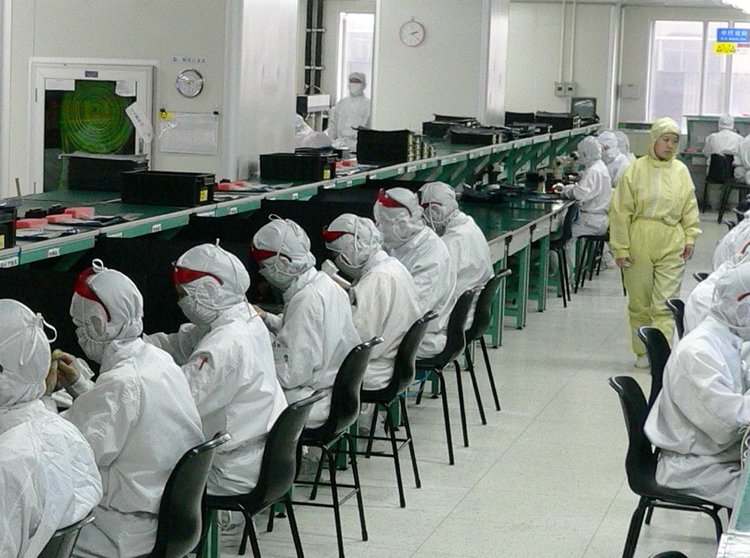
    Samsung has been searching for a prime location to set up a new multi-billion-dollar chip production plant for a while now, and it’s most certainly happening in the United States. The company already has one semiconductor chip foundry in th U.S., based in Austin, Texas.

    The Korean tech giant has already been reported to be considering Florida, Arizona, Austin, and even New York at different times for the new project, but Samsung didn’t end up sticking to any of those locations for the 17-billion plant.

    Now, we seem to have evidence that Samsung’s most recent target location falls in Taylor, Texas. While nothing has been set in stone, the city has already been offering the company powerful incentives in terms of tax breaks. And we’re talking huge tax breaks—namely 92.5% for the first decade, which will slowly decrease over time after that.

    When interviewed a Samsung spokeswoman said that “A final decision has not yet been made regarding the location.” Samsung had chosen Williamson County in Austin, Texas, for its first chip plant for the stable water and electricity sources available there, as well as similar financial incentives on offer.

    And having already considered Austin once more previously for its second plant, it seems reasonable to say that Samsung definitely seems rather inclined to begin construction in Texas. The Texan Governor, Greg Abbott, is already expected to make a big “economic announcement” at an event today (November 23), at 5PM local time—reinforcing people’s suspicions that it will be about Samsung’s new chip plant.

    The company has already confirmed to state officials that the new project will create about 1,800 jobs in the area, and plans to begin eking out chips in 2024 at the latest, once the location is chosen. We’ll update the article if tonight’s announcement in Texas does bring news of an official location for Samsung’s second U.S.-based chip foundry.
  • Android Q will improve your phone’s battery life

    Android Q will improve your phone’s battery life

    Nah, we aren’t talking about Google introducing a systemwide Dark Mode in Android Q. No amount of LTE tower pinging, talking on the phone, or any other usual suspect when it comes to wireless radio battery drain can affect your mileage as much as constant Wi-Fi scanning for non-existent networks.

    This thing is a giant power hog, and you should kill it with fire if you have exhausted all the usual culprits for your battery drain. Bonus points: by default, Google tracks you even when Bluetooth and Wi-Fi are off, so if you ditch scanning, you’ll make it harder.

    Type “Improve accuracy” in the settings’ search box, then turn Wi-Fi and Bluetooth scanning off. Type “Locating method” and switch it to “Phone only,” if you need to keep GPS on at all times.

    When playing Pokemon Go, navigating, or any other scenario you need high accuracy for, turn it back on for the sesh if you are adamant to eke out every last drop of your battery juice, yet now Android manages the scanning permissions pretty well itself.

    With Android Pie, Google drastically reduced the number of scan attempts to one every 30 seconds for front apps, and one in 30 minutes for apps that are just sitting in the background. Despite the outcry from developers of indoor location or signal strength measurement apps, Google has decided that the scanning restrictions will remain an integral part of Android Q:

    Once again, thank you for submitting a request. After following up with our product and engineering teams, the request will not be considered at this time. In Q, there is a new developer option to toggle the throttling off for local testing (Needs a rooted device).

    While we feel sorry for devs of apps that can be affected, we can’t wrong Google for deciding to put an end to rogue Wi-fi scanning that drains battery like crazy and was one of the chief culprits behind standby power drains in previous Android versions. Whew.

  • Android Q will support wide-color gamuts

    Android Q will support wide-color gamuts

    Google announced that Android will be gaining system-wide support for wide color gamut images starting with Android 10 Q. The next version of Android will allow you to capture, view, and easily share pictures with wide color gamuts. This will introduce more richness in terms of color reproduction compared to the standard sRGB color space.

    All things considered, Android’s adoption of wide color gamuts comes across as a rather logical move that reflects on the advancements we’ve witnessed in imaging technology, in terms of both camera and display improvements. As more and more devices these days come along with screens excellently-calibrated to the sRGB standard, but also support wider gamuts, supporting these more realistic color spaces right off the bat in stock Android signals an important milestone for Android as an operating system and its gradual shift towards quality-of-life enhancements.

    At Android, we have been working to make wide color photography happen end-to-end, e.g. more bits and bigger gamuts. This means, eventually users will be able to capture the richness of the scenes, share wide color pictures with friends and view wide color pictures on their phones.

    What color spaces are we talking about? Android Q will most certainly support Display P3 and Adobe RGB, with the door being left ajar for other wide-color gamuts as well.  Of course, developers will have to update their apps and make sure they support wide-color gamut content once Android Q launches this summer, and in order to ease up this change, the company has rounded up a few do’s and don’ts of adapting to wide color gamuts. Probably the most important requirement is that apps should never assume an sRGB color profile of any external image it gets and should check the ICC color profile embedded in the image file.

    Of course, not every app would end up adopting wide-color gamuts, and Google advises that developers at least be color-correct, meaning that they should take the necessary steps to decode wide-color images to sRGB.

    You can test if your device is Display P3 compatible by opening out this image – if you see a faint Android logo, your display supports the Display P3 color space; otherwise, if you see a solid red square, then either your device or your browser is not compatible. Some devices that should display the image correctly are Apple’s latest iPhones, which will do that straight in the browser, while others like Samsung’s Galaxy S10 series will only do that if you download the image and view it in the stock gallery. You can also check out this website for more comparison images.

  • Android Q beta now available for OnePlus 7 Owners

    Android Q beta now available for OnePlus 7 Owners

    Here is some good news for developers and risk takers who just purchased the OnePlus 7 or OnePlus 7 Pro. The latest Android Q beta (which is number 3) is now available for the phones. OnePlus announced this on its blog and pointed out that “this build of Android Q is best suited for developers and early adopters.” Why? Because beta versions of the software are often filled with more bugs than a Raid test facility. And if the OnePlus 7 or OnePlus 7 Pro is your new daily driver, who wants to deal with a problem that prevents you from using an important feature on the phone?

    Speaking of problems, there are some known issues with the third Android Q beta preview. The Ambient Display, which uses machine learning to learn how bright or dim you like the display to look under certain conditions, is not working. There are also some problems with system stability, and texts can’t be sent when the Voice over LTE setting is enabled. The gestures used to navigate the phone also don’t work, and neither does Recovery mode. OnePlus also points out that some apps might not work the way you expect them to with this beta release.

    Some warnings. While signing up to join the Android Q beta program on a Pixel is a simple and easy procedure that allows you to receive updates OTA from the first beta build you receive, signing up for the OnePlus 7 or OnePlus 7 Pro requires that you load a zip file, and then flash the necessary files. All of the directions can be found on the OnePlus blog, including how to put your phone back on track to receive stable builds OTA. Either way, you will lose all of the data stored on the device so you might want to back up your data first.

    If you’ve done this before and are very familiar with flashing a ROM on a phone, this might not be so difficult. But if you’ve never done this before, a mistake could lead you to accidentally brick your phone. If you decide to proceed, make sure that your OnePlus 7 or OnePlus 7 Pro has at least 30% battery life and 3GB of storage available or higher.

  • Android Q may have a life-saving feature exclusive to Pixel phones

    Android Q may have a life-saving feature exclusive to Pixel phones

    At Google I/O this year, the company behind Android revealed many new and exciting things coming to the next iteration of the world’s most popular mobile OS. These include native support for foldable devices, system-wide Dark Mode, Smart Replies and Suggestions, and a handful of other features.

    But aside from those, savvy developers have uncovered something else that’s coming with Android Q, and it wasn’t mentioned at this year’s I/O. The folks over at XDA have found lines of code in the Android Q Beta 3, referencing a possible automatic car crash detection feature. The beta has an app called Safety Hub, and strings of code within the app suggest that automatic car crash detection is coming to Android Q, and that it may also be a Pixel-exclusive feature.

    Google is no stranger to introducing Pixel-exclusive features, though they’ve been more on the “bonus” side of things, so to speak. Two prominent examples are the excellent Night Sight mode, baked into the Google camera app, and unlimited Google Photos storage for original quality photo backups, available only to Pixel phone owners. However, more essential features have always managed to make their way into Android skins by other OEMs, so the upcoming car crash detection may start as a Pixel-exclusive thing and become more widely available thereafter.

    It’s currently unclear how Android Q will detect car crashes, though it’s likely going to happen by gathering data from various sensors on the phone. For example, Google could use GPS data to determine whether you’re driving, use the accelerometer to detect when a violent stop occurs, and even rely on the microphone to pick up the sound of the crash. After an accident has been detected, the Safety Hub app could automatically alert emergency services and/or select contacts.

    We have our fingers crossed that future Android Q betas will reveal more about this potentially life-saving feature, and that it won’t be Pixel-exclusive forever.

  • Android Q will bring an iconic Apple iPhone feature

    Android Q will bring an iconic Apple iPhone feature

    Introduced in 2015 with the Apple iPhone 6s and iPhone 6s Plus, 3D Touch allows iOS users to press the screen to see previews, details, and shortcuts. Some applications allow users to Peek and Pop. For example, you can get a preview of an address in the Maps app. That’s a “Peek.” Applying a little harder force will “Pop” you into the app. Note that for technical reasons related to the Liquid Retina display on the iPhone XR, that model does not feature 3D Touch.

    In Android 8 Oreo, Google added a long press gesture that allows Android users to see shortcuts related to certain apps. That feature was continued on Android 9 Pie. For example, press hard on the YouTube icon in either build, and you’ll see shortcut options that can take you to the app’s search feature, and a list of your YouTube subscriptions. Documentation for Android Q reveals that the next Android build will allow users to see the same information, only faster, with a “deep press.”

    Found inside documentation for MotionEvents is a statement that says a touch on the touchscreen can be classified as a “deep press” when a user presses harder on the screen intentionally. This will “accelerate the long press behavior.” In other words, a “deep press” will reveal the same information as a long press, only quicker. Unlike 3D Touch, it doesn’t appear that Android devices will be able to distinguish between a light press, a medium press, and a hard press.

    Google could turn to algorithms to determine whether a user is using enough force to count a touch as a “deep press.” Or, the new feature might require specialized hardware. Either way, we could hear more about this during Google I/O. The annual developer conference will run from May 7th through May 9th. During the conference, Google traditionally reveals new features that will be found on the upcoming Android build.

    Just the other day, Google disseminated the second beta preview for Android Q. This included a foldable device emulator to help developers see how their apps will look on one of the new foldable phones that will be released soon. That includes the Samsung Galaxy Fold, due out on April 26th, and the Huawei Mate X. That model will be launched sometime this summer. Another feature called Bubbles allows you to take the functionality of certain apps with you from screen to screen on Android Q.

    Google plans on releasing six beta versions of Android Q with the final version scheduled to drop during the third quarter. If you have a Pixel handset, you can quickly sign up to receive the Android Q beta versions OTA. Simply head to the Android Beta for Pixel website and click on the Devices tab. Scroll down to “Your Eligible Devices” and tap the Opt-in button. Expect to wait up to 24 hours before the update arrives. When you’re ready to return to the public version of Android, repeat the process and tap on the Opt-out button. Keep in mind that the beta versions of Android are unstable and many of the features that you might depend on could fail to work. As a result, you might want to think twice before signing up to receive the Android Q beta previews.