Tag: safer

  • Google’s Android Auto Enhances Driver Safety With Innovative Call Screening And Notes Features

    Google’s Android Auto Enhances Driver Safety With Innovative Call Screening And Notes Features

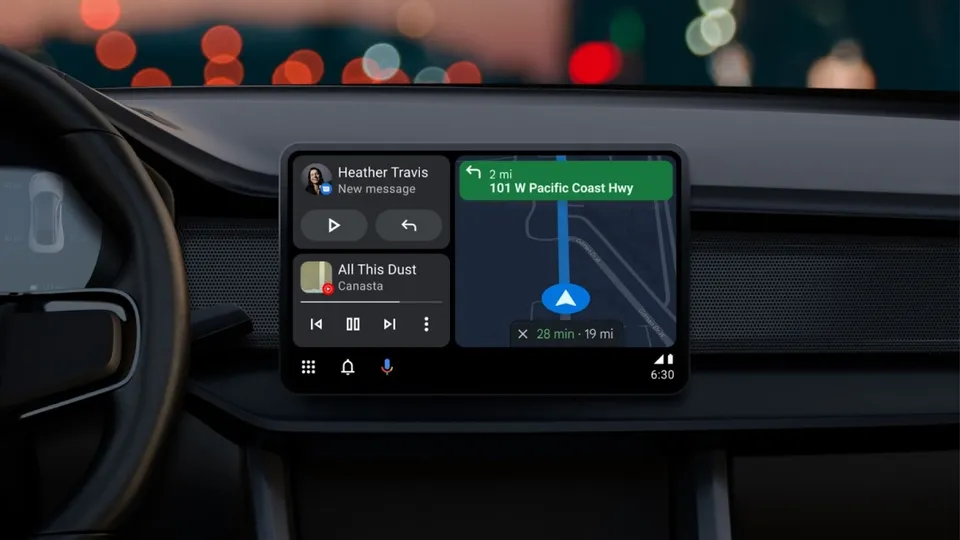
    Google has announced the implementation of new features to Android Auto, designed to augment safety and convenience for drivers. The recent update incorporates Call Screening and Call Notes, enabling drivers to handle calls in a more sophisticated way, without diverting their attention from driving.

    Call Screening in Your Car

    The latest update allows Android Auto to screen incoming calls, particularly from unknown or unsaved numbers, on behalf of the driver. When a call is received, the system prompts the caller to identify themselves and state the purpose of the call. The driver is then relayed the responses, providing them the choice to accept or reject the call without having to answer it manually.

    This innovative feature helps to deter unwanted interruptions while driving, ensuring that drivers only receive pertinent calls. By reducing distractions, it offers a smart safety solution.

    Call Notes: Keep Track of Key Points

    Android Auto plans to support Call Notes later this year. This tool automatically generates a summary of your calls in text format. It proves particularly beneficial for business or crucial conversations that cannot be recorded while driving.

    Call Notes was initially introduced with Google’s Pixel 9 phones. Now, by incorporating it into Android Auto, it aims to enhance productivity on the move.

    Why These Additions Matter

    These two enhancements offer tangible benefits for drivers:

    Reduced Distractions: Drivers no longer need to physically manage each incoming call while driving.

    Better Context: Call Notes enables drivers to capture key points from calls without the necessity of manually taking notes.

    Keeping Up with Competition: Apple’s iPhones already provide call screening within CarPlay. Google is maintaining its competitive edge by integrating this feature into Android Auto.

    Questions & Answers

    What are the new features introduced in Android Auto?
    The new features introduced are Call Screening and Call Notes, aimed at reducing distractions and improving convenience for drivers.

    What is the purpose of the Call Screening feature in Android Auto?
    Call Screening allows Android Auto to screen incoming calls on behalf of the driver. The system prompts the caller to identify themselves and state their reason for calling, giving the driver the option to accept or reject the call without manually answering it.

    What is the function of Call Notes in Android Auto?
    Call Notes is a feature that automatically creates a text summary of your calls. It assists drivers in keeping track of important points from calls without having to manually take notes.

  • Google makes its apps safer and more private for teens and pre-teens

    Google makes its apps safer and more private for teens and pre-teens

    Google announced today some changes made to give teens and pre-teens more control over some of Google’s most popular apps. Over the next few weeks, Google will debut a new policy that enables anyone under 18 years old or their parent or guardian to request the removal of the child’s image from Google Image results including Search. As Google itself points out, “Of course, removing an image from Search doesn’t remove it from the web, but we believe this change will help give young people more control of their images online.”

    Over the next few weeks, the following changes are coming to Google apps for those under 18. YouTube will change the default upload settings for those 13-17 to the most private option available. Some useful digital wellbeing features will be promoted by Google and Google will provide safeguards and educate teens about commercial content from the app. Those 13-17 will have autoplay turned off by default while bedtime and break reminders will be enabled by default.

    As the Alphabet subsidiary says, “We regularly engage with kids and teens, parents, governments, industry leaders, and experts in the fields of privacy, child safety, wellbeing, and education to design better, safer products for kids and teens. Having an accurate age for a user can be an important element in providing experiences tailored to their needs.

    Yet, knowing the accurate age of our users across multiple products and surfaces, while at the same time respecting their privacy and ensuring that our services remain accessible, is a complex challenge. It will require input from regulators, lawmakers, industry bodies, technology providers, and others to address it – and to ensure that we all build a safer internet for kids.”

    Teens using Google Search can be protected by SafeSearch which prevents the kids from seeing search results not meant for their eyes when enabled. It is on by default for users under 13 whose accounts are managed by Family Link. With the latter, parents can decide at what time their kid’s device shuts off for the day. Google plans in the coming months to turn SafeSearch on by default for existing users under 18 and make it the default setting for teens setting up new accounts.

    When it comes to teens using Google Assistant, the company says, “We’re always working to prevent mature content from surfacing during a child’s experience with Google Assistant on shared devices, and in the coming months we’ll be introducing new default protections. For example, we will apply our SafeSearch technology to the web browser on smart displays.”

    Children using supervised accounts don’t have the option of turning on Location History which is turned off by default for all accounts. Soon, Google will prevent users under 18 globally from being able to turn on Location History. In addition, a new safety section for the Play Store will allow parents to know which apps meet Google’s Family policies. Apps will also have to disclose how they use the data they collect in greater detail allowing parents to decide whether to allow their kids to install the app.

    Google will also prevent age-sensitive ad campaigns from being shown to teens and those under 18 will not be allowed to be targeted by advertisers based on age, interests, and gender. New digital wellbeing tools will allow parents to “block news, podcasts, and access to webpages on Assistant-enabled smart devices.”

    Anne Collier, executive director of the Net Safety Collaborative stated, “Being mindful about tech use is key to everyone’s wellbeing. These new defaults for teens are protective; they increase safe, mindful tech use by making teens think about what they want to see and who they want seeing their content.”