Tag: whatsapp

  • WhatsApp starts rolling out the ability to pin messages

    WhatsApp starts rolling out the ability to pin messages

    Meta has just announced that pinned messages are debuting on its WhatsApp messaging app. The new feature is currently rolling out to users, but it will take some time for everyone to see it in their app.

    An extensive FAQ related to the new feature is now available for users to peruse in order to learn how pinned messages work. The procedure is quite simple on both iOS and Android platforms.

    Android users can tap and hold the message, tap the three-dot icon, choose Pin, and then select the pin duration: 24 hours, 7 days, or 30 days. On the other hand, iPhone users must tap and hold the message, tap More options, then tap Pin and select the pin duration: 24 hours, 7 days, or 30 days.

    To unpin a message before the time runs out, simply tap and hold the message, and choose Unpin. iPhone users will find Unpin in the More options tab after tapping and holding the message. For web and desktop users, head to the message that you want to unpin, click the arrow down icon, and choose Unpin.

    As far as group chats go, WhatsApp mentions that group admins can choose to allow members to pin messages in group chat. This option is available on Android devices by turning Edit group settings on or off in the Group Settings menu.

    On iPhones, the option is available in the Group info / Group Settings / Edit Group Settings / select All members or Only Admins. Remember that when a message is pinned in a group chat, a system message will be shared with everyone on the chat.

  • WhatsApp now lets iOS users share media in original quality

    WhatsApp now lets iOS users share media in original quality

    WhatsApp isn’t known for the quality of media files people share between them, in fact, the opposite. Although an update rolled out last summer added the option to share videos and photos in HD format, WhatsApp users still can’t send media files in the original quality.

    However, that’s about to change, as the app is now getting a new update that allows WhatsApp users to send media files like photos and videos in original quality.

    For now, the update is only making its way to iOS users, so if you’re using an iPhone, you should be looking for WhatsApp version 23.24.73. The new stable build was spotted by WABetaInfo, which also posted the official changelog.

    Apart from the ability to share original quality media as a file, the latest version of WhatsApp for iOS introduces a couple of other new features. For example, WhatsApp users can now start voice chats without ringing in large groups.

    Also, developers have added new bubbles in chat to help users see missed ongoing and completed calls. Finally, WhatsApp users on iOS can now quickly react to a Status using their avatar by tapping “Reply” and selecting one of the 6 available avatar reactions.

    As per WhatsApp’s changelog, these features will be rolled out over the coming weeks, so if you don’t see one or more of these changes, you’ll have to wait a bit longer.

    Keep in mind that in order to send original quality media as file, you’ll have to tap “+” in chat, click Document, and then “Choose Photo or Video” to get started.

  • WhatsApp adds new secret code feature to help protect chats

    WhatsApp adds new secret code feature to help protect chats

    WhatsApp has just announced a small, yet important update that further improves the app’s privacy and security aspects. Secret code is a new feature that allows users to secure locked chats and add an extra layer of security.

    Thanks to the new feature, WhatsApp users can now set a unique password different from what they use to unlock their phones to protect locked chats. In addition, the new feature introduces the ability to hide the Locked Chats folder from the chatlist, which means that they can only be discovered by typing the secret code in the search bar.

    This is an optional feature, so you can still choose to have all your locked chats (or some of them) still appear in the chatlist. Another nifty quality-of-life change is the way you can lock chats after the update.

    Previously, in order to lock a chat, you had to visit the chat’s settings. However, with the latest version of WhatsApp, you can simply long press to lock a chat, no need for extra taps.

    According to WhatsApp, the new secret code feature is already rolling out, but it will take months to be available globally, so be patient if you don’t see it on your phone yet.

  • WhatsApp for Android brings back Muted Updates and Channel Polls

    WhatsApp for Android brings back Muted Updates and Channel Polls

    WhatsApp, one of the world’s most popular instant messaging apps, is constantly rolling out new features and updates in an effort to improve the user experience. In the past week alone, the app’s developers have released two new beta updates on Android that introduce a couple of interesting features, including the return of Muted updates and the ability to create and share polls within Channels.

    As reported by WaBetaInfo, WhatsApp brought back Muted updates in version v2.23.24.11 of the Android beta app, which had disappeared from the main Updates tab following the arrival of Channels. Previously, users could still access Muted updates by tapping the three-dot menu in the Updates tab, but this was not as convenient as having them directly displayed in the main tab.

    Shortly after, v2.23.24.12 was released, which introduces the ability to create and share polls within Channels. This feature is similar to the polls feature that is already available in one-on-one and group chats, but with a few key differences.

    In order to prevent spamming and ensure that poll results are accurate, the feature within Channels are limited to one choice per user. Additionally, in order to protect privacy, Channel polls are also anonymous — meaning that no one can see who voted for what.

    The ability to create and share polls within Channels is a useful new feature that can be used for a variety of purposes, such as gathering feedback from community members or running contests and giveaways. Similarly, the return of Muted updates is a welcome change for users who prefer to keep their status updates muted. With this feature, users can easily view all of their muted status updates in one place without having to navigate through multiple menus.

    Unfortunately, as both of these features are currently only showing up for a limited amount of users using the beta app, and the WhatsApp beta program is currently — and almost always — full to capacity, it might be a bit until we see then both show up on the stable public app.

  • WhatsApp takes privacy a step further by testing a way to completely hide locked chats on Android

    WhatsApp takes privacy a step further by testing a way to completely hide locked chats on Android

    WhatsApp is rolling out a new update through the Google Play Beta Program that includes a new feature to hide locked chats. The feature is currently in development, but it is expected to be available to all users in a future update.
    WhatsApp officially rolled out the Chat Lock feature back in May as a way to keep your most sensitive conversations private. When you lock a chat, it will be protected by a password or biometric authentication. This means that only you will be able to open and read the chat, even if someone else has access to your phone.

    However, as spotted by WaBetaInfo, WhatsApp is now taking this one step further by adding a new feature to hide these locked chats altogether, which will make it even more difficult for someone to access them. This addition is now live on the latest WhatsApp beta for Android, version 2.23.22.9.

    Without the feature enabled, anyone with access to your phone could still be able to see that you have locked chats and may be able to guess the password or biometric authentication. However, when the feature enabled, the list of locked chats is completely removed from the chat list, making it almost impossible for someone to even know that you have locked chats without having your secret code.
    The option to turn this feature on is accessible within the app’s settings, with a clear “Hide locked chats” toggle in the Chat lock settings section. Once turned on, users will need to enter their secret code into the search bar to unlock the locked chat list.

    This new feature will improve user privacy by making it more difficult for anyone with access to the phone to even realize that locked chats exist. This is especially important for users who have sensitive or confidential conversations that they want to keep hidden from prying eyes.


  • WhatsApp announces passkeys support for Android users

    WhatsApp announces passkeys support for Android users

    Last week, Google announced that passkeys would become the default authentication method for its users on personal accounts. Within that announcement, Google also stated that passkeys support is growing, listing a few of the companies that had already enabled them on their apps and websites, with a mention of WhatsApp as one of the ones that would be adding compatibility soon.

    This confirmed earlier reports that WhatsApp had already tested this functionality with its beta users and would be tied to Google’s Password Manager. Today, WhatsApp finally announced that passkeys support is now official for its Android users who can now use their device’s screen lock method to unlock their accounts, such as their face, fingerprint, or device pin.

    Previously, WhatsApp had implemented an optional two-step verification pin and a fingerprint lock feature that users could set to trigger automatically after a set length of time. This type of authentication is not being removed from the app, but rather joined now by passkeys, offering an additional layer of security.

    Although passkeys support has now been made public by the company, it appears that the feature is not yet live on the latest stable version of the app (v2.23.20.76). However, it is definitely working in the latest beta (v2.23.21.12) for those enrolled in the WhatsApp beta program.

    The signup process is quick and straightforward as it is using the screen lock method that you already use on your phone. Additionally, through this signup process, you learn that your newly created passkey is indeed being stored in Google’s Password Manager, which makes it possible to use on other devices where you are signed in to your Google account. It is unclear at this time if an app update is forthcoming for the stable version of the app, or if the feature will be rolled out in stages via a server push.

  • WhatsApp announces better online shopping experience

    WhatsApp announces better online shopping experience

    WhatsApp is trying to create new experiences in addition to the basic chat experience that everyone knows and loves. Businesses and business-oriented features have been the focus of WhatsApp’s development strategy for quite some time, but few projects have materialized in actual features that users can take advantage of.

    Early this week, WhatsApp announced Flows, a new purchase service that allows users to buy products and services directly within the app. Either is a train ticket, a meal or an appointment booking, Flows is supposed to make the purchasing experience in WhatsApp as simple and snappy as possible.

    WhatsApp promised to make Flows available to businesses around the world, at least those that use the WhatsApp Business Platform, in the coming weeks. Flows will allow businesses to provide WhatsApp users with menus and customizable forms that support their needs.

    In addition, WhatsApp announced that it’s making it easier to complete a purchase directly in the chat. First, users in India will be able to add items to their car and send a payment using one of the various supported methods like UPI apps, debit and credit cards, and more. To make the purchase experience safe and simple, WhatsApp is working with partners like Razorpay and PayUu.

    Finally, WhatsApp is introducing a verification process, which will provide Meta Verified statuses to businesses that successfully demonstrate their authenticity. Those businesses will receive a verified badge, enhanced account support and impersonation protection, WhatsApp says.

    Furthermore, Meta Verified will offer some additional premium features for interested businesses, including the ability to create a custom WhatsApp page discoverable via a web search and multi-device support.

    WhatsApp will start testing the Meta Verified feature with small businesses using the WhatsApp Business app very soon, so this won’t be available to businesses on the WhatsApp Business Platform yet.

  • New WhatsApp beta on TestFlight includes WhatsApp Beta for iPad

    New WhatsApp beta on TestFlight includes WhatsApp Beta for iPad

    Popular messaging app WhatsApp has never offered an app for the iPad. Instead, iPad users who want to use the platform are forced to use the web version of WhatsApp using a mobile browser. That’s because in the beginning, there wasn’t a separate iPadOS operating system for the tablets and WhatsApp didn’t work with the iPad.

    From time to time, there have been several false starts, including a couple of years ago when Facebook founder and CEO Mark Zuckerberg (Meta owns WhatsApp) and WhatsApp chief Will Cathcart discussed a possible iPad app for WhatsApp in a group chat.

    Per WABetaInfo, the latest version of the WhatsApp Beta (version 23.19.1.71), available only from Apple’s TestFlight, is compatible with the iPad. You will have to be a member of the WhatsApp for iOS official beta program on TestFlight to install WhatsApp on your iPad. Once you install it, you will need to scan a QR code using your iPhone. The app will then download all of your conversations, and you’ll be able to send and receive messages on your iPhone, iPad, and Mac.

    Once the app is installed on the iPad, users will be able to use WhatsApp on their Apple tablets regardless of whether their iPhone is nearby or not, even if the devices aren’t sharing the same Wi-Fi signal. The WhatsApp app for iPad is limited in that you cannot open a new WhatsApp account from it, similar to the version of WhatsApp made for the desktop. It offers more content on the screen thanks to the larger displays.

    It isn’t known when the public will get access to this app and as we said, the Beta is available only from Apple’s TestFlight, so there is limited availability. But that will change as soon as WhatsApp for iPad becomes available in the App Store.

    We should point out that WhatsApp’s sibling, Instagram, also does not offer an app for iPad. Both WhatsApp and Instagram were purchased by what was then known as Facebook in February 2014, and April 2012 respectively.

  • WhatsApp officially launches its Channels feature globally

    WhatsApp officially launches its Channels feature globally

    WhatsApp announced today via its official blog the launch of its new Channels feature in over 150 countries as well as the addition of thousands of new channels. WhatsApp Channels have been in the works since earlier this year as a way to give users a private outlet to receive updates from organizations, sports teams, artists, and notable figures.

    Channels are different from the regular chats you are used to on WhatsApp, as they are separate and whoever you choose to follow is not visible to others, hence their focus on privacy. WhatsApp users have the option to browse through various channels and decide to track those that interest them.
    Through the feedback received from those that were privy to using this feature in one of the ten countries were it was originally being tested, the company worked to add the below updates to the Channels feature just in time for the global release:
    • An enhanced directory that makes it easier to find channels to follow, filtered by country.
    • Reactions, so you can give feedback on Updates using emojis.
    • Editing, so admins can make changes to their Updates for up to 30 days.
    • Forwarding, so you can share Updates with others and they can easily find the channel.

    WhatsApp also promises that more features will continue to be added as the Channels features grows and expands, and that these features will be based directly on user feedback. One of them will be the ability for anyone to create a channel, similar to the way this same feature currently works on Instagram.

    The WhatsApp Channels rollout appears to be staged at the moment in the latest version of the app. Once available, Channels that you can follow can be found in the new “Updates” tab, including the official WhatsApp Channel which you can follow to stay up to date on any new additions to the app.
    However, if you still don’t have the feature and don’t want to keep checking to see when it’s available for your account, you can click on the WhatsApp Channel link — or any channel link for that matter — and you should get a popup within the application with an option to be notified when it’s ready.
  • WhatsApp HD video support starts rolling out to everyone

    WhatsApp HD video support starts rolling out to everyone

    Meta’s Mark Zuckerberg teased last month the imminent arrival of one of WhatsApp’s most requested features, the ability to share HD videos. Although some Android and iOS users got the feature last month, the global rollout has only just begun.

    Today, WhatsApp officially confirmed that it had started to roll out HD video support on its messaging app. With this addition, WhatsApp users can finally send both photos and videos in high-definition format, although the feature needs some refinement.

    For example, no toggle would allow you to set WhatsApp to send all pictures and videos you want to share in HD format by default. You have to select this option every time you share a media file with one of your contacts, which is a bit annoying, but it’s better than not having the feature at all.

    If you’ve been sharing videos until now, you’ll notice that the resolution has been upgraded from 476 x 848 to 718 x 1280 pixels. Yes, you still can’t share videos in their original resolution, which more often than not is higher than 720p. Still, this is a considerable upgrade over the previous quality, especially since the size of an HD video is almost doubled.

    Meanwhile, WhatsApp is currently testing multi-account support, but we won’t know when it drops until it’s already here. However, if you’re running a beta version of the app, you’re probably already using it on your Android phone.

  • WhatsApp will give you more control over video messages with a small update

    WhatsApp will give you more control over video messages with a small update

    Ever get annoyed when something just doesn’t work quite right? It might be handy, it might have its uses, but there’s still that feeling of having to scoot the chair to crack open the fridge, you know what I mean? Well, sometimes, these irritating quirks come from apps, and it’s a relief when they get fixed, even if it is a minor update. Small updates can make a big difference and it seems like WhatsApp gets that.

    WhatsApp is introducing additional control options for its instant video messages feature. If you’ve updated to the latest WhatsApp beta for iOS (version 23.18.1.70) or the WhatsApp beta for Android (version 2.23.18.21), you might spot a new setting in the app. This setting allows beta testers to turn off, if they want, instant video messages.

    WhatsApp had already made it possible for its users to record and share video messages through the app’s latest updates in July. Without this new toggle, the feature is active by default, which means you can switch between video messages and voice notes by tapping the voice note button.

    But for some users who prefer not to use video messages, having to select voice messages over video messages every time manually can be quite annoying. So, with this update, users can turn the toggle off, and tapping the voice note button won’t switch to video messages anymore.

    However, it’s important to note that this option won’t block short video messages. You’ll still be able to receive and play them, but you won’t be able to send video messages when this option is turned off.

    It’s worth mentioning that even if you don’t plan to disable video messages, it’s good to check that toggle. Some beta users have reported finding it turned off unexpectedly, even if they’ve sent video messages before.

    The toggle for managing instant video messages is now available to some beta testers who’ve updated their WhatsApp beta for Android via the Google Play Store and WhatsApp beta for iOS through the TestFlight app, and it will reach more people in the next few days.

  • WhatsApp may soon get new text formatting tools

    WhatsApp may soon get new text formatting tools

    WhatsApp is already one of the best messaging apps, but there’s always room for improvement. That’s why we’re getting new updates that bring important new features almost every month. Recently, the app added support for high-resolution photos and promised to bring support for HD videos very soon too.

    On top of that, we’ve just learned that WhatsApp is working on additional text formatting tools that will make communications easier and even more fun. The fine folks over at WabetaInfo spotted a brand-new feature in the latest beta version of WhatsApp, which indicated that Meta’s developers have started to implement new text formatting tools.

    There’s proof about three new text formatting options, which will be added on top of the already available italics, bold, strikethrough, and monospace options.

    The first one is called “Code Block” and is aimed at software developers and programmers who might want to send code snippets to their friends or colleagues. This particular text formatting tool will prevent the confusion created when code snippets were not being displayed accurately in the chat window.

    Another interesting text formatting tool, Quote, will receive a small yet important improvement. WhatsApp plans to introduce a new option that will allow users to highlight portions of a text that they want to quote. Currently, you can only quote entire messages, not parts of them.

    Last but not least, one of the latest beta versions of WhatsApp had a new formatting tool that allowed users to create lists of items. That will basically eliminate the need to manually add bullet points to every item that you want to be included in your list.

    The report mentions that these features are now in development, so it may take some time until WhatsApp actually releases them for everyone to use. Still, it’s nice to know what we’ll be getting in future updates, even if these new features won’t be available for a long time.

  • WhatsApp’s multi-account support feature is now available for select beta users

    WhatsApp’s multi-account support feature is now available for select beta users

    WhatsApp has been rolling out a lot of new features lately, but we’re expecting the messaging app to get even more in the coming weeks. Meta’s successful acquisition is testing new features all the time, but only select beta testers have access to these.

    The folks over at WabetaInfo made a habit of dissecting every new beta version of the app WhatsApp releases to discover all the new stuff the company plan to bring sooner, later, or sometimes, never.

    WhatsApp beta for Android 2.23.17.8 is very important because it brings one of the most requested features, the ability to add multiple accounts to the app.

    As per WabetaInfo’s findings, the new feature is fresh out of the oven and is now going through the usual beta testing before being released worldwide. Only select beta testers have access to multi-account support, but its availability might expand as the testing process progresses.

    With multi-account support, WhatsApp users can add a new account to their app by tapping the arrow icon next to the QR code button. Switching between accounts can also be done from the same menu. New accounts will remain attached to your WhatsApp app until you log out.

    The addition of multi-account support will make it easier for WhatsApp users to keep all their conversations from multiple accounts on a single device. It’s an incredibly useful feature for those with more than one WhatsApp account and currently using two devices to handle them.

    Since the feature is now going through the testing process, it might get some changes, but at least we know it’s in the pipeline. Regardless of the form it will take in the end, multi-account support is coming folks, so be ready to throw away that second phone that you’ve been keeping to manage your multiple WhatsApp accounts (or not).

  • WhatsApp begins rollout of instant video messages in chats

    WhatsApp begins rollout of instant video messages in chats

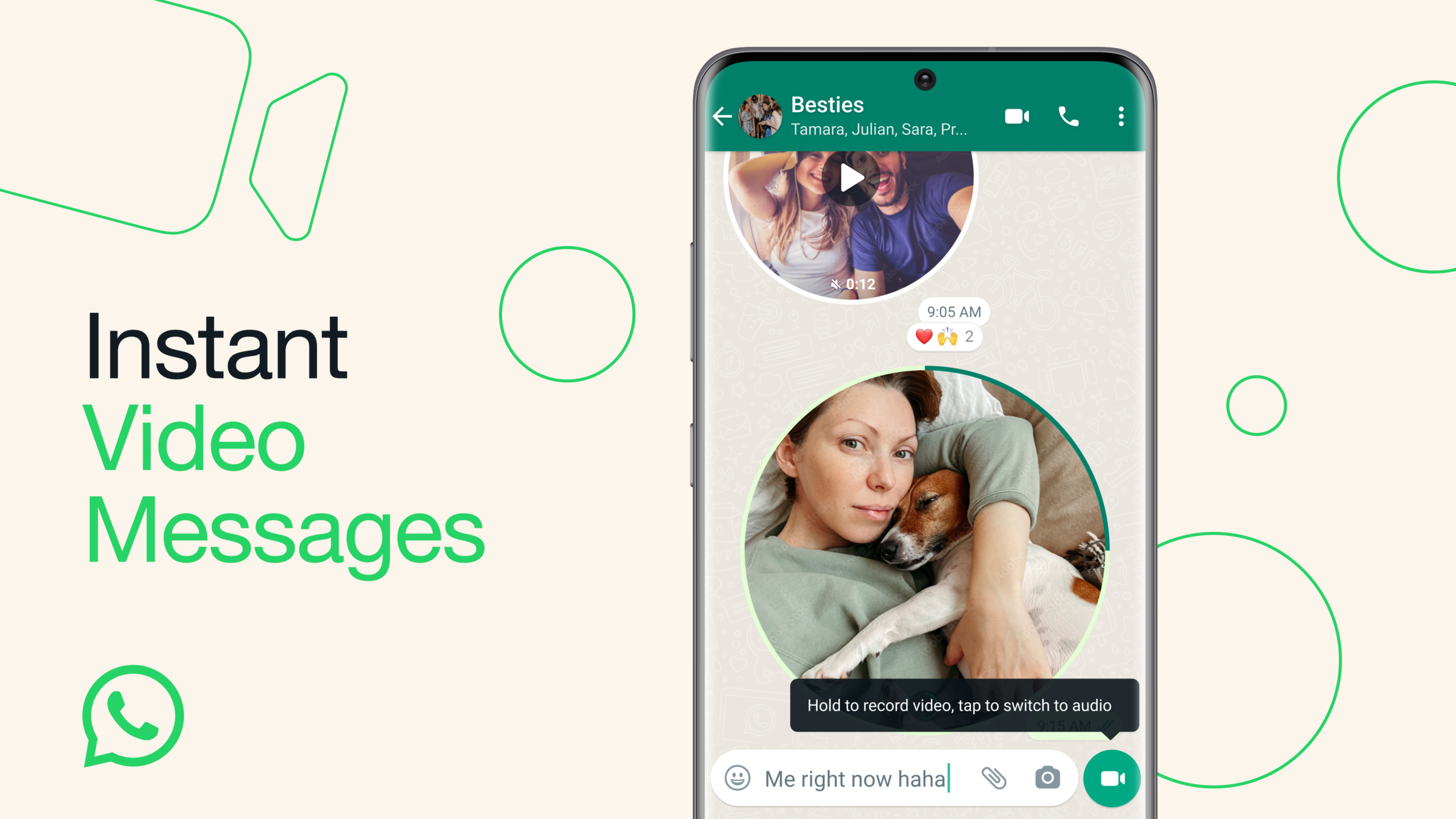
    WhatsApp continues on its quest to revolutionize communication by adding more and more methods to share your thoughts. Now, in addition to its popular voice messages, WhatsApp is adding video to the mix.

    The popular messaging app has announced the rollout of instant video messages where its users can easily create and share brief personal videos directly within a chat. This was also shared by Meta’s CEO, Mark Zuckerberg by a message on his Instagram channel, followed by a video on how the feature will work.

    Video messages can be up to 60 seconds long, which the company believes is long enough to add a personal touch to users’ interactions and allow them to share their experiences more vividly. They are also very easy to use, making use of the same button WhatsApp users are already using to send voice messages, employing a neat little trick to switch from audio to video mode.

    Tapping on the microphone icon will switch to video mode and holding the button will start to record video. Additionally, a swipe-up feature allows you to record hands-free.

    Upon opening a video message in a chat, the video will automatically play without sound, but you can easily enable the audio by tapping on it. Video messages are protected with end-to-end encryption to ensure your privacy, providing a secure communication experience.

    The rollout of video messages has already begun, and over the next few weeks, it will become available to all users. This follows the release of a brand new WhatsApp standalone app for Wear OS after years of relying on notifications for users to view their messages on their smartwatch. We hope this trend of releasing timely features continues for WhatsApp as it can only benefit its users, especially when there are so many different messaging app options to choose from.

  • WhatsApp adds new Chat Transfer feature

    WhatsApp adds new Chat Transfer feature

    WhatsApp has been rolling out new features to its messaging app like there’s no tomorrow. Several updates were released last month alone (not counting the beta version), which is unusual even for one of Google’s most popular apps. Over the weekend, WhatsApp announced yet another new feature is making its way to Android and iOS users: Chat Transfer.

    Announced on Twitter, the new feature allows WhatsApp users to transfer their full chat history without having to leave the app. However, there’s a big catch, as the feature can only transfer data across the same operating system, so if you’re planning to switch from Android to iOS or vice versa, the new Chat Transfer feature will not work.

    If you’re an Android or iOS user who wants to switch to a different operating system, you can transfer your WhatsApp chats using apps like Move to iOS. The new feature announced over the weekend has the same functionality, but it makes it possible to transfer WhatsApp chats without having to leave the app, albeit only across the same operating systems.

    To take advantage of the new feature, you must set up a new account on your new phone and choose the Chat Transfer option to create a QR code. Then, simply scan the QR code provided with the old phone and wait for the phones to connect and the data to be transferred to the new smartphone.

    According to Google, the ability to transfer WhatsApp chats without having to leave the app is available starting today, although it may take a few weeks to show up for everyone, so be patient if you didn’t get it yet.