Retail News CRM

Tag: ios

  • iOS 17.4 beta released with App sideloading and alternative browser engines in the EU

    iOS 17.4 beta released with App sideloading and alternative browser engines in the EU

    Apple has just released the iOS 17.4 beta developer beta 1. Following the wide public release of iOS 17.3 just a few days ago, the writing was on the wall for a new developer build. And it’s here for all those adventurous enough to test out a developer beta, which are these days free to test-drive.

    An earlier beta of iOS 17.3 served as a stark reminder that betas are nothing to scoff at and shouldn’t be used on daily drivers without an adequately recent backup. In particular, that ill-fated beta caused some iPhones with the Back Tap feature enabled to get stuck in a bootloop, which is never a good thing to experience.

    What’s major here, however, is Apple complying with the EU’s Digital Markets Act (DMA) and adopting tons of changes to Safari, the App Store, and iOS itself. The directive, which essentially allows iPhone users in the EU to benefit from sideloading apps from third-party app stores, enjoy non-WebKit-based browsers, and additional safeguards to tone down risks for users will arrive with the public release of iOS 17.4.

    Essentially, iOS 17.4 will allow users in the EU to:

    • sideload apps from third-party app stores (currently only developers can sideload apps)
    • use browsers based on another engine (all iOS browsers right now rely on Apple’s WebKit engine)
    • choose their default browsers the first time they launch Safari after iOS 17.4 (currently not available in the beta)

    Apple says that it has included more than 600 new APIs as well as expanded app analytics but doesn’t miss the opportunity to once again voice concerns about “new avenues for malware, fraud and scams, illicit and harmful content, and other privacy and security threats.” One way to combat this is a new safeguard protection dubbed Notarization for iOS apps, which aims to reduce risks by authorizing marketplace developers can peddle apps or take alternative payments.

    Still, the word “risk” appears some 22 times in the press release, revealing that Apple is adopting this EU-mandated change very casually.

    Some developer-intended new iOS features that will arrive with iOS 17.4 but aren’t necessarily part of the newest beta include:

    • New options for distributing iOS apps from alternative app marketplaces
    • New framework and APIs for creating alternative app marketplaces
    • New frameworks and APIs for alternative browser engines
    • Interoperability request form
    • Notarization for iOS apps
    • App installation sheets
    • Authorization for marketplace developers
    • Additional malware protections

    When sideloading, iOS users in the EU won’t be able to benefit from some of the regular perks. For example, purchases of app ouside of the App Store won’t be detailed in the latter and Apple won’t be able to issue a refund. Family Purchase Sharing and Ask to Buy also won’t be compatible with apps downloaded and/or purchased outside of the App Store.

    However, App Tracking Transparency will still work with apps coming from alternative stores, so users will be able to forbid apps from sharing tracking their data and sending it to the respective app developer.

    Apple says that all of these changes will come into effect in March, so we should most certainly expect iOS 17.4 to go out of beta and arrive as a public release to all iPhone users before March. Of course, non-EU iOS users needn’t worry as seemingly nothing will change for them. No sideloading and no alternative app stores and browser engines are to be expected in the US.

  • YouTube may have removed the iMessage mini-app for iOS devices

    YouTube may have removed the iMessage mini-app for iOS devices

    It appears that YouTube might have removed the iMessage mini-app that allows iPhone and iPad users to send videos directly from chat without leaving the Messages app.

    The latest YouTube app update released earlier this week mentions changes like improved performance and bug fixes, but it may have also removed the iMessage mini-app.

    The folks at 9to5mac confirm that the iMessage mini-app for iPhone and iPad is no longer available after the latest YouTube update, but at this time it’s impossible to tell whether or not this is something temporary.

    It’s been nearly seven years since the iMessage mini-app has been added to YouTube. Unfortunately, it never became popular among iOS users, even though the app allowed them not just to send YouTube videos directly from the chat without leaving the Message app, but they could also watch videos using the native YouTube app.

    Let us know in the comments if the feature disappears for you after updating the YouTube app to version 19.01.1. Although it might be hard to guess YouTube’s plans about the iMessage mini-app without an official statement.

  • New iOS 17.3 feature will keep a thief out of your iPhone and your banking apps

    New iOS 17.3 feature will keep a thief out of your iPhone and your banking apps

    Now that Apple released iOS 17.2, the first iOS 17.3 developer beta has been released and includes a new feature that might frustrate iPhone thieves. Stolen Device Protection uses certain tools to prevent criminals from employing a stolen iPhone passcode to have the run of an iPhone that is at a location normally not associated with the owner of the device. If an iPhone is at such a location and Stolen Device Protection is enabled, the handset will require that Face ID or Touch ID be used before allowing certain actions to be made.

    Actions that require either Face ID or Touch ID when an iPhone is in an unusual location include viewing passwords stored on the device and wiping the phone. A one-hour delay will be called for when creating a new Apple ID password. After the hour, Face ID or Touch ID will still be required to change the password. The delay is essentially buying time for the owner to report his phone stolen.

    Apple adds another layer of biometric protection to the iPhone in iOS 17.3; Image Credit Beta Profiles.

    Other actions that require biometric approval when Stolen Device Protection is enabled and an iPhone is away from the user’s usual locations include applying for an Apple Card, turning off Lost Mode, and accessing and using payment methods stored in Safari. If Face ID or Touch ID fails and Stolen Device Protection is enabled, the user cannot use his/her passcode to sign in.

    The following actions will require Face ID or Touch ID when Stolen Device Protection is enabled:

    • Viewing/using passwords or passkeys saved in iCloud Keychain
    • Applying for a new Apple Card
    • Viewing an Apple Card virtual card
    • Turning off Lost Mode
    • Erasing all content and settings
    • Taking certain Apple Cash and Savings actions in Wallet
    • Using payment methods saved in Safari
    • Using your iPhone to set up a new device

    The following actions require Face ID or Touch ID and the final action is delayed by one hour:

    • Changing your Apple ID password
    • Updating select Apple ID account security settings, including adding or removing a trusted device, trusted phone number, Recovery Key, or Recovery Contact
    • Changing your iPhone passcode
    • Adding or removing Face ID or Touch ID
    • Turning off Find My
    • Turning off Stolen Device Protection

    Stolen Device Protection is supposed to prevent a scam that starts when someone makes friends with an iPhone user or spies on one in order to obtain his/her passcode. Sometimes this is done by looking over the shoulder of the iPhone user or by asking to see a photograph and watching as the iPhone user unlocks his handset using his/her passcode.

    The thief then steals the iPhone, enters the purloined passcode, resets the Apple ID password, disables Find My, performs a factory reset, and sells the device. A working iPhone is more valuable in the black market than one that is locked down; the latter device is generally sold for parts. Alternately, the thief could use the passcode to steal passwords for banking and other financial apps, email passwords, and more that are stored in the iCloud Keychain.

    If Apple keeps the new feature in the final version of iOS 17.3, most iPhone users won’t get this feature until sometime early next year. If you installed the first developer beta of iOS 17.3, you can enable Stolen Device Protection by going to Settings > Face ID & Passcode > Stolen Device Protection.

  • Strava brings free messaging to iOS and Android

    Strava brings free messaging to iOS and Android

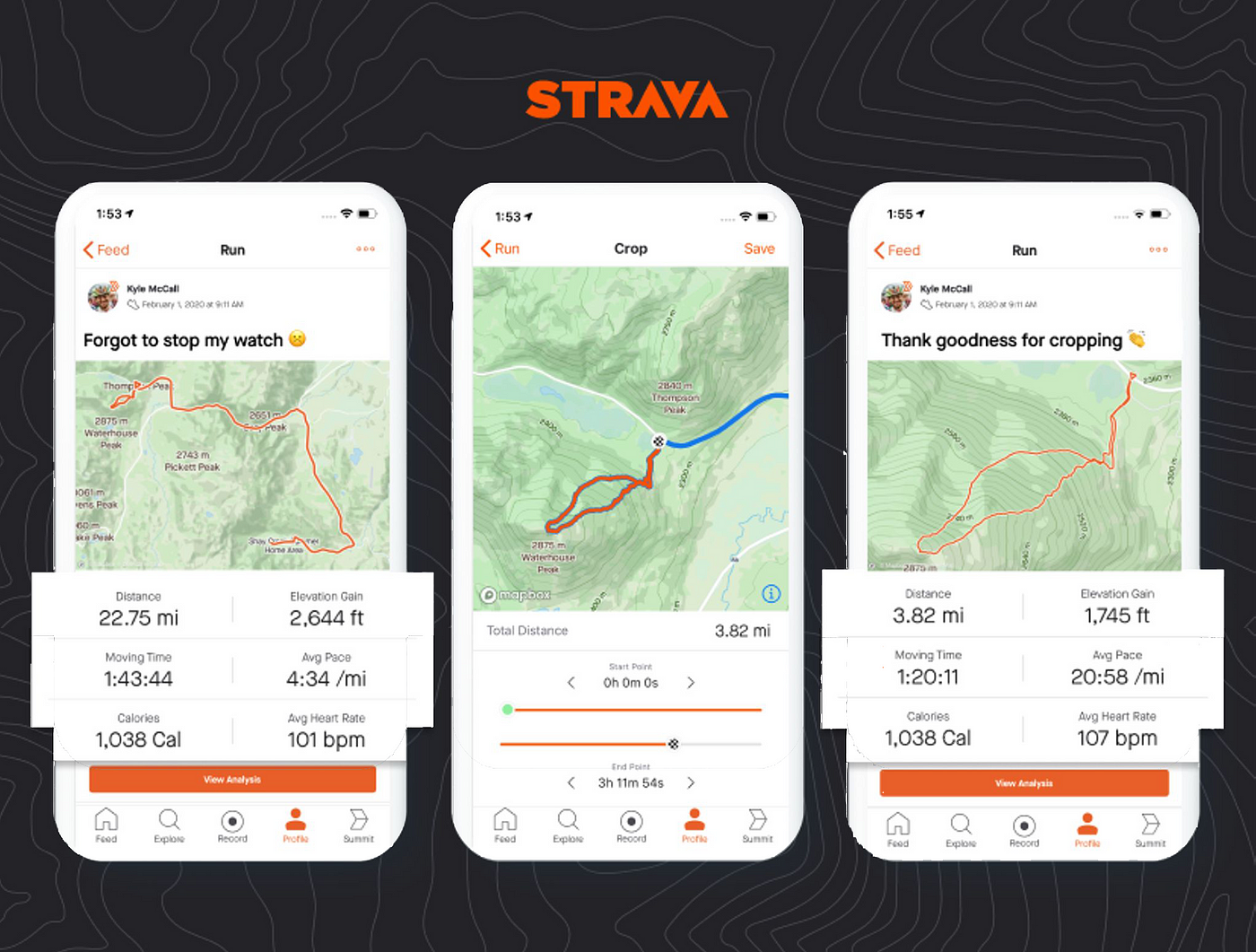
    Strava made an exciting move this week, announcing messaging for iOS and Android users. The popular mobile app for athletes revealed a new feature that will be available for free to all its users, Messaging.

    Launched this week, the new feature offers users two options: direct (one-on-one) and group messages. In addition to these key features, Strava’s messaging tool provides more functionality in the forms of even more features:

    • Easily share Activities and Routes to messaging to help assist in coordination and celebration.
    • Message creators can personalize the name of group chats for a more tailored experience.
    • Athletes can bring motivation, hype and even some friendly competition through message reactions, gifs, and replies.

    The Messaging feature on Strava can be customized based on the user’s desired experience on the platform. For starters, Strava users can set their preferences on who can invite them to a Group Message or who can message them directly.

    Also, the feature’s settings will be automatically set based on a user’s profile visibility, but it can be adjusted to receive messages to and from “Following,” “Mutuals,” or “No One,” under settings in the Strava app.

    To send a message, simply tap the corresponding button on the profile of the Strava user you wish to message. Remember that while you can send messages to Strava users who follow you, you may not be able to message to a user depending on their privacy controls.

  • iPhone users should expect to receive iOS 17.1.2 next week

    iPhone users should expect to receive iOS 17.1.2 next week

    Get ready iPhone users because iOS 17.1.2 is coming your way. MacRumors says that it has seen evidence of the update in its website’s analytics logs. Some of the higher profile bugs that still need to be exterminated include one that has prevented iPhone users running iOS 17.1 and later from wirelessly charging using the in-car charging pad of their General Motors vehicle. Apple had previously disseminated iOS 17.1.1 to eliminate a bug that broke NFC on iPhone 15 series handsets that charged using BMW’s in-vehicle charging system.

    Without NFC, the damaged iPhone units could not use Apple Pay and some received an error message saying that Apple Pay could not be set up on their devices even if the feature had already been used on these phones. Apple-certified techs were told to use Apple Service Toolkit 2 software in order to revive the NFC chip on damaged units, while some were told that their iPhones had to be opened up to repair or replace some of the hardware. While BMW warned iPhone 15 series users not to use the in-vehicle charger on new vehicles, Apple did push out iOS 17.1.1 to fix the issue at the beginning of this month.

    The iOS 17.1.2 update will probably be released next week since Apple traditionally stays away from releasing any new software builds during the week of Thanksgiving in the U.S. That’s because many of Apple’s employees are given the week off. Last year, a similar situation occurred with iOS 16.1.2 and the latter was finally released on November 30.

    As for iOS 17.2, Apple has been pushing out beta builds of the update with the final version expected in the middle of next month. The update will add support for spatial video recording for the iPhone 15 Pro models; these videos will be viewable with the Apple Vision Pro headset once it is launched. The iPhone’s new Journal feature will be available once iOS 17.2 is installed along with new Clock and Weather widgets, and an option that will allow iPhone 15 Pro series users to have the Translate app open when the Action button is long-pressed on the phone.

    But before iOS 17.2 arrives, iOS 17.1.2 will be released possibly to fix the GM wireless charging bug and any other annoying issues that iPhone users are currently dealing with.

  • Update to iOS 17.1 brings an important change to the Action Button

    Update to iOS 17.1 brings an important change to the Action Button

    The iPhone 15 Pro and iPhone 15 Pro Max have the new Action Button above the volume rocker that replaced the Mute switch. With the new Pro models, the Action Button can be set to have a certain action take place when the button is pressed. To customize the button, the user goes to Settings > Action Button. The first Action that you can set the button to do is to act as a Silent mode switch that turns the Silent mode on or off which is exactly what the Mute switch used to do.

    Swipe to the left once and you get the next option, Focus, which silences notifications and filters out distractions. Other options appear as you swipe to the left including the ability to tap the button and open the camera, turn on the flashlight, start and stop recording a voice memo, use your phone as a magnifying glass, activate your favorite shortcut, use an accessibility feature, or have the Action Button take no action when pressed. When you find the Action option you want, just leave the appropriate icon showing on the image of the Action Button on the screen and leave the page.

    Cde discovered by 9to5Mac in iOS 17.1 beta 3, which was released to developers today, reveals that Apple is making a change to the Action Button. When the phone, using the proximity sensors, detects that it is in your pocket, the Action Button will require a longer press to activate. This prevents the feature from accidentally getting activated when the iPhone is inside your pocket.

    There is no setup required for the new feature to work and it will be automatically enabled for iPhone 15 Pro and iPhone 15 Pro Max users as soon as they install iOS 17.1 (once it is released). An accidental “pocket” activation of the Action Button on an iPhone 15 Pro series model could set off a shortcut that you’ve created that might disable the ringer, for example, turn off other features of the phone without you knowing, share your location and even share the last image you snapped.

  • Apple’s hefty new 6TB and 12TB iCloud+ plans are now available for your hoarding pleasure

    Apple’s hefty new 6TB and 12TB iCloud+ plans are now available for your hoarding pleasure

    Although last Tuesday was very clearly Apple’s big day in the spotlight for the season, the Cupertino-based tech giant is treating its hardcore fans and devoted followers to a bunch of exciting announcements today as well.

    These include the highly anticipated public rollouts of the latest iOS, iPadOS, watchOS, and tvOS versions but also something else that was originally announced at last week’s iPhone 15 family launch event, going largely unnoticed due to the sheer number of objectively more glamorous products and features introduced for the fall.

    We’re talking about two new iCloud+ options, which are now available in the US at $29.99 and $59.99 a month. That may sound like a lot of money to spend on cloud storage for your iPhone, iPad, Mac, or even Windows computer (because it is a lot of money), but you do get a lot of storage (as well as other cool stuff) at these sky-high monthly rates.

    Specifically, you’re looking at a hefty 6TB allotment for the “cheaper” of the two newly released plans and an even larger 12TB bucket at the disposal of anyone willing to cough up 60 bucks every… single… month. Of course, the humbler 2TB, 200GB, and 50GB options are not going anywhere, and they’re unfortunately not getting any more affordable either, still fetching $9.99, $2.99, and $0.99 respectively a month stateside.

    All iCloud+ plans come with “premium” features like Private Relay for Safari users, Hide My Email, HomeKit Secure Video, and custom email domains, thus providing very stiff competition in terms of both versatility and affordability for rival platforms like Google One.

    In case you’re wondering, Google’s cloud storage service doesn’t have these same tiers, offering 5 and 10TB allotments in exchange for $25 and $50, respectively, and 20 and 30TB options at $100 and $150, respectively.

  • iOS 17 and iPadOS 17 are now available for download

    iOS 17 and iPadOS 17 are now available for download

    Apple has delivered on its promise from the Wonderlust event, and iOS 17 and iPadOS 17 are ready for download. If you’re eager to upgrade to the latest iOS or iPadOS version, just follow these simple steps.

    Head over to Settings, tap on General, and select Software Update. From there, you can download the latest update. If you’re not in a rush to explore what iOS 17 and iPadOS 17 have to offer, you can simply let your iPhone or iPad handle the download in inactive hours, but make sure it’s while charging.

    If your battery is running low, it’s a good move to juice up your phone or tablet before diving into the update. Also, it’s a smart call to connect to Wi-Fi unless you want to be left wondering where all your mobile data went. After your iPhone or iPad gets that new OS update, it’s time to dive in and explore what’s new. But before you jump in, let’s take a quick peek at some of the coolest new features.

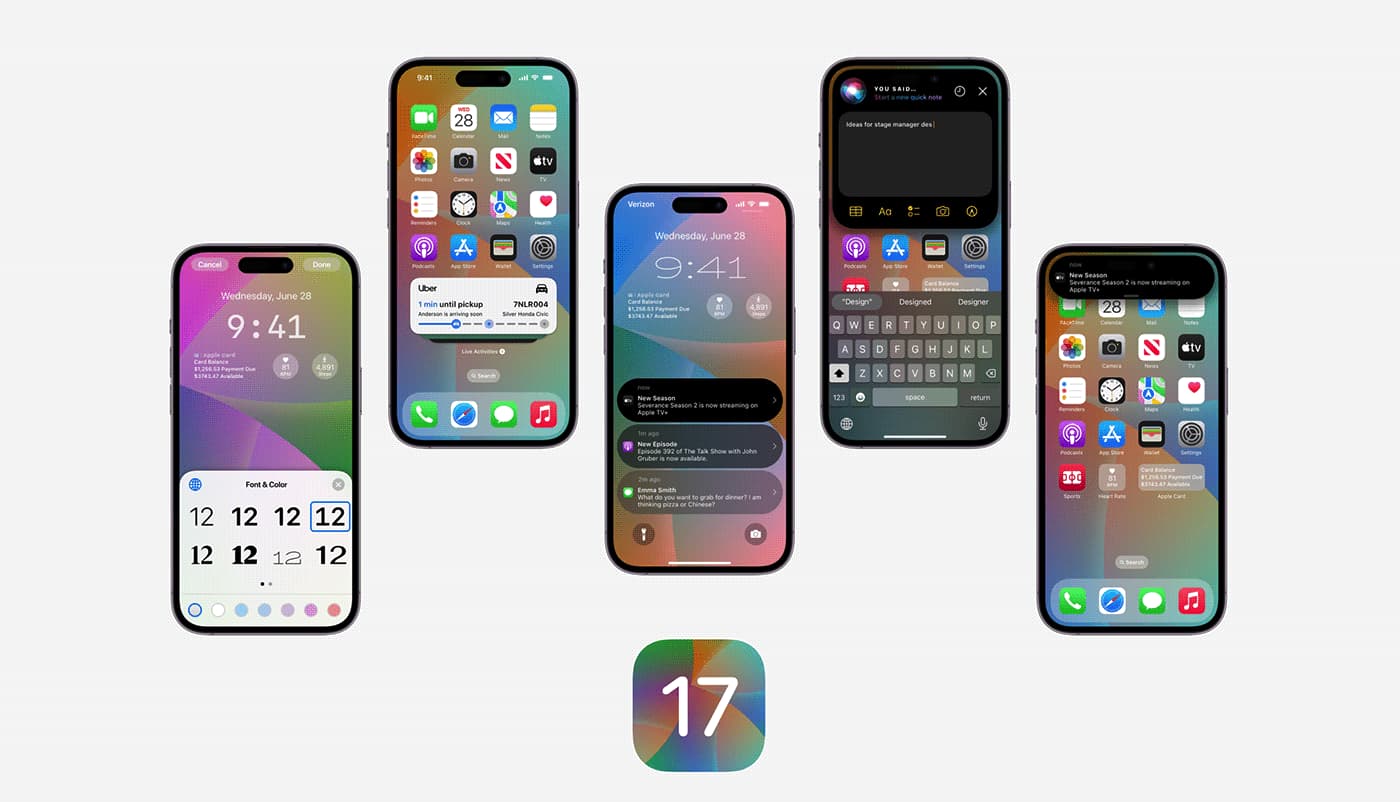
    iOS 17 brings in Contact Posters, which lets you decide how you want to show up on the other person’s screen when you call them. You can jazz it up by creating a full-screen calling card with a photo, emojis, and more.

    You can also explore Live Voicemail. When someone is leaving you a voicemail, their message gets transcribed to text on your lock screen in real time. After seeing what it’s all about, you get to decide if you want to answer the call.

    You can also leave a video message on FaceTime or quickly share contacts using NameDrop – bring your iPhone close to another iPhone. Plus, there’s an upgraded Private Browsing mode, better Autocorrect, and some fresh emojis thrown into the mix. For a full rundown of all the cool stuff iOS 17 has in store for your iPhone.

    Now, you can slap interactive widgets onto your iPad’s home screen, not just to peek at info but to play around with it too, right from those widgets. Plus, iPadOS 17 brings lock screen customization to your iPad, just like on the iPhone.

    The Health app is making its way to the iPad in iPadOS 17, making the most of that large screen and giving you a better look at all your health stats and data. If you’ve got an Apple Watch, sync it up with your iPad, and you’ll have all your health info right there on the bigger screen.
  • Report says to expect iOS 17 and iPadOS 17 to be released together unlike last year

    Report says to expect iOS 17 and iPadOS 17 to be released together unlike last year

    Writing about tech is like having a large family. There are so many dates to remember. But instead of remembering the birthdate of that weird Aunt with the three nostrils and the wedding anniversary of the Uncle who won’t say any word beginning with the letter “T,” you have to remember that Apple will introduce the new iPhone 15 line on September 12th and Google will unveil the Pixel 8 series on October 4th.

    Apple is doing its part to make life a little easier for us writers this year by setting up its release schedule to allow for the simultaneous release of iOS 17 and iPadOS 17. Last year, iOS 16 was dropped by Apple on September 12, five days after the introduction of the iPhone 14 line. The release of iPadOS 16 didn’t take place until October 24th. The delay was caused by changes Apple needed to make to its multitasking Stage Manager apps and Windows organizer.

    Gurman writes that he has been told that the recently released eighth beta of iOS will be considered by Apple to be the final beta test before the release of the final public version unless something unexpected shows up. So if you are interested in being the first in your family with an iPhone that runs iOS 17, or if you want to impress your friends by telling them about new features like StandBy Mode (which essentially turns the iPhone into a smart display when it is charged in landscape orientation) now might be the most low-risk time to install the iOS 17 beta.

    To join the beta, direct your browser to beta.apple.com or click on this link. Tap on the name of the software release you’re interested in installing (for example, iOS 17) and follow the directions.

    Other features coming to iOS 17 include the ability to create a personalized Contact Poster which is what another iPhone user sees when you call them. An exciting feature will allow you to send a call to voicemail and read the transcript of the message being left in real-time. If you want to take the call after all, you can cut in and start talking to the caller.

    And if you have helicopter parents, a new iOS 17 feature will alert your Mom, Dad, other family members, and friends when you arrive at your destination. Of course, all of them must have an iPhone that is running iOS 17.

    If you don’t want to risk loading a beta on your daily driver, you might as well wait it out; the release of iOS 17 and iPadOS 17 is just days away.

  • Apple releases iOS 16.6 to patch several software flaws some of which have been actively exploited

    Apple releases iOS 16.6 to patch several software flaws some of which have been actively exploited

    Apple has released iOS 16.6 for the iPhone and iPadOS 16.6 for, well, the iPad. The updates will patch several vulnerabilities including one that impacts the Apple Neural Engine. The latter delivers on-device natural language processing and image analysis faster and with more energy efficiency than the CPU or GPU. Apple says that an app might be able to  execute arbitrary code with kernel privileges which means an attacker could run any command on a targeted iPhone or iPad.

    This patch is heading to iPhone 8 and later, iPad Pro (3rd generation) and later, iPad Air (3rd generation) and later, and iPad mini (5th generation). A vulnerability on the Find My app could allow sensitive location information to be divulged via an app. This patch will be available to the iPhone 8 and later, iPad Pro (all models), iPad Air 3rd generation and later, iPad 5th generation and later, and iPad mini 5th generation and later.

    Several patches for the Kernel are part of the update. This is the core part of an operating system. With one flaw, Apple says it is aware of reports that the vulnerability has been actively exploited on versions of iOS released before iOS 15.7.1. With this vulnerability, “an app may be able to modify sensitive kernel state” allowing the attackers to manipulate how the operating system runs.

    Other possible attacks against the iOS and iPadOS kernels listed by Apple include one that could allow the attackers to elevate privileges giving them the ability to do more than standard users. Another flaw could lead to a denial-of-service attack that could prevent users from accessing the features and apps they want to use. And another vulnerability can give an attacker root privileges. This could allow an attacker to create a backdoor, add a trojan, or delete any information on an iPhone or iPad.
    There are two vulnerabilities listed for the WebKit browser engine including one that has been actively exploited according to reports that Apple has become aware of. With these security issues, it is a good idea to install the update now. Go to Settings > General > Software Update and follow the directions. Other updates available today include watchOS 9.6, macOS 13.5, and tvOS 16.6.
  • The final version of iOS 16.6 is just days away

    The final version of iOS 16.6 is just days away

    Apple can’t wait to get iOS 16.6 out, especially in light of the issues that caused it to try three times to patch a serious WebKit vulnerability in iOS and iPadOS 16.5. Apple was aware of reports that said the flaw was being actively exploited and could cause arbitrary code execution which would allow an attacker to steal your personal data. So out went iOS 16.5.1 and iPadOS 16.5.1. But before you could spell Cupertino, Apple pulled both releases because of some bugs found in the software.
    Using its Rapid Security Response system, instead of developing iOS 16.5.2 and iPadOS 16.5.2, Apple released iOS 16.5.1 (a) and iPadOS 16.5.1 (a). But the two updates changed the user agent for mobile Safari. The user agent tells the server all about a device’s browser so it knows what version of the content to serve. For example, it tells the server whether to show the mobile or desktop version of a website or the U.S. or U.K. version of a site. The bugs also prevented iPhone and iPad users from accessing sites like Zoom, Facebook, and Instagram.
    Knowing how serious the vulnerability affecting WebKit was, Apple pulled iOS 16.5.1 (a) and iPadOS 16.5.1 (a) and quickly replaced them with iOS 16.5.1 (c) and iPadOS 16.5.1 (c) and that is where we stand at the moment. However, the Release Candidate for iOS 16.6 was released to developers today which means that update is probably less than a week away. The Release Candidate builds give beta testers the opportunity to test the final build of an update before it is released to most users. Apple continues to split its resources between the remaining builds of iOS 16 and the iOS 17 beta which should end in September with the release of stable iOS 17.
    Besides the Release Candidates for iOS 16.6 and iPadOS 16.6, Apple dropped the Release Candidates for watchOS 9.6, macOS Ventura 13.5,  and tvOS 16.6. All of the updates’ release notes indicate that they will fix minor bugs found on the various OS builds.
    You can check for the new update on your iPhone or iPad by going to Settings > General > Software Update. When the update arrives, you will be prompted to press the appropriate buttons. For the Apple Watch, open the Watch app on your iPhone and tap the My Watch tab at the bottom of the screen. Go to General > Software Update. On Apple TV go to Settings > System > System Update.
  • Apple tests faster haptic duration speed in the latest iOS 17 Beta

    Apple tests faster haptic duration speed in the latest iOS 17 Beta

    The release of the second iOS 17 Beta to developers on Wednesday includes a new setting that will make iPhone users feel the phone’s haptic feedback kick in faster than on iOS 16. Haptic feedback is considered an Accessibility feature which means that the settings can be found by going to Settings > Accessibility > Touch > Haptic Touch. There you will see a box with two options: Fast and Slow. You can adjust how soon after you long-press on the screen you’ll see a content preview, action, or a contextual menu.

    On iOS 16, as we said, there are just two options, Fast and Slow. The latest iOS 17 Beta release adds a third setting so the options are Fast, Default, and Slow. Tap the setting you want and an arrow will appear on it. The new Default setting is equivalent to the Fast setting in iOS 16. In the iOS 17 Beta, selecting Fast gives you an even faster duration for the haptic feedback compared to the same setting in iOS 16 which means that things take place at a faster pace.

    Whether you change the duration speed in iOS 16 or the iOS 17 Beta, you can test out the duration of the haptic speed you choose by long-pressing on the image of a flower under the heading  “Touch Duration Test.” Note the difference in each setting with the time it takes the image of the flower to reach its full size after you feel the haptic feedback.
    To reiterate, there are currently two haptic feedback duration options in iOS 16 which are Fast and Slow. The latest iOS 17 Beta has three: Fast, Default, and Slow. The Fast in the iOS 17 Beta is faster than the Fast available in iOS 16 and the Default in the iOS 17 Beta is equivalent to the Fast setting in iOS 16. Got it?

    Of course, some changes that are made during a Beta are tested and rejected before reaching the final version of the software. So there is no guarantee that Apple will keep the new faster haptic duration speed in the final version of iOS 17. If it does, you’ll have to test it out for yourself to see whether it gives you a faster and improved iPhone experience.

  • Google apps like Maps, Translate, Calendar and Lens are getting integrated into the iOS Chrome app

    Google apps like Maps, Translate, Calendar and Lens are getting integrated into the iOS Chrome app

    There are some changes being made by Google to the iOS version of Chrome in order to “help you quickly get more done from your browser.” Google notes that Chrome is using “AI to detect addresses on webpages.” Press on an address inside of a webpage and you’ll see an option to “View with Google Maps in Chrome.” Tapping on this option will reveal a mini Google Maps in Chrome that will allow you to “Get Directions” to the address on the webpage that you tapped, or open the full Google Maps app.
    Tap on a date listed on a webpage in the iOS version of Chrome and you’ll see two options: one to add that date to the Google Calendar app, and one to add that date to Apple Calendar. If you choose to add it to Google Calendar, contextual information will be used to fill out some of the blanks and you can adjust some of the information to meet the particulars of the appointment you are adding to the calendar.
    Now here’s another cool feature coming to the iOS version of Chrome. Tap on a passage found on a website written in a foreign language and a toolbar will appear on the display that includes a “Google Translate” option. Tap on it and the section of the webpage you wanted to be translated will appear in English (or your home language).
    And in the coming months, the search/URL bar at the top of the iOS version of Chrome will include the iconic Google Lens camera icon on the right side of the bar found near the top of the screen. Tap on it and you can “use your camera to search with new pictures you take and existing images in your camera roll.” Think of Lens as another way to access Google’s search engine using photos to input what you want to search for. Currently, an icon for Lens can be found in the search bar near the top of the iOS Google Search app.
    It isn’t clear when these new features are coming to the iOS version of Chrome so it will be a matter of trial and error until you find that each of these new features is available on your iPhone.
  • Microsoft finally brings Phone Link to iOS users

    Microsoft finally brings Phone Link to iOS users

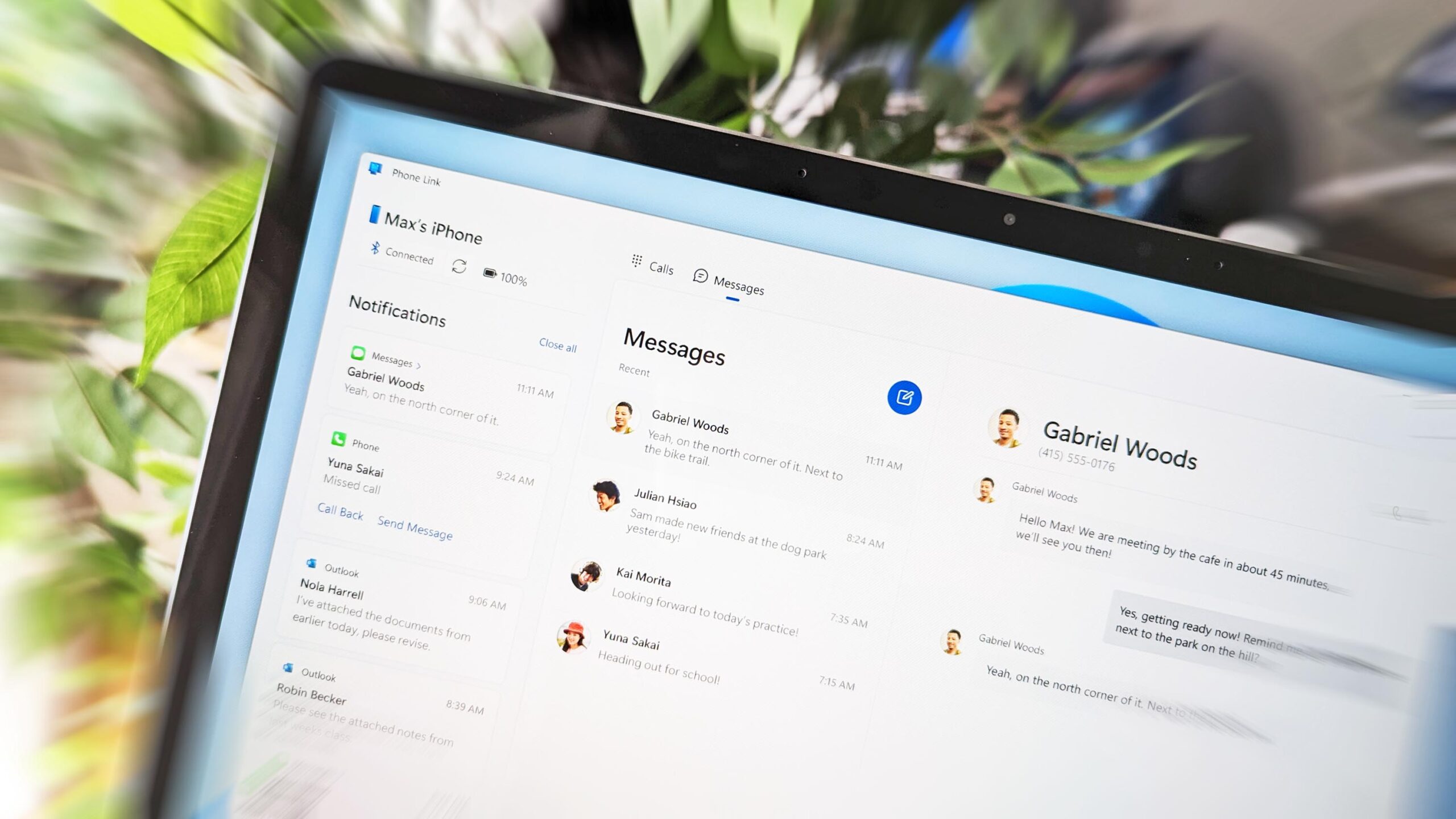
    It’s been years since Microsoft supported Android users with Phone Link, the app that allows them to connect smartphones to their PCs. Starting today, the same app is available for iPhone users, Microsoft revealed in a blog post. However, the experience is quite limited and pales in comparison with the features Phone Link for Android provides users.

    Announced back in February, the expansion of the Phone Link app to iOS is finally happening, as Microsoft announced the app is now rolling out globally in 39 languages across 85 markets.

    As per the company’s statement, once Phone Link is enabled on a Windows 11 PC, the app should provide some basic iOS support for calls, messages and access to contacts. iOS users can also access their iPhone photos on their PC thanks to Microsoft’s iCloud integration with Photos. Basically, you’ll be able to see your iPhone photos in the Photos app in Windows 11.

    While the rollout of the app has already begun, it may take a few weeks to be visible on all PCs. To start using Phone Link for iOS, use the Search box on the Windows taskbar to find Phone Link, and then follow the step-by-step guide to set it up.

    Regarding requirements, Microsoft confirmed that Phone Link for iOS is compatible with iPhones running iOS 14 or higher. The app will only work on Windows 11 devices and requires Bluetooth connection. Keep in mind that iPads and macOS are not compatible with this version of Phone Link.

    It’s also worth mentioning that iOS limit the messaging feature, and image/video sharing, as well as group messaging will not be supported. Microsoft notes that all messages are sessions based and will only be received when the phone is connected to PC.

  • iOS 17 could end software support for the iPhone X and other Apple devices

    iOS 17 could end software support for the iPhone X and other Apple devices

    Apple’s iPhones have a general reputation for being considerably more future-proof than the average smartphone, to the extent such a concept is possible in the mobile tech world. This sentiment is partly based on the fact that the Cupertino company commits to ensuring the long-term software support of all of its devices.

    But all good things must come to an end… even software support for smartphones as iconic as the iPhone X. According to a new leak, iOS 17 will be dropping the support for a number of iPhones, including the iPhone X, and the iPhone 8 and iPhone 8 Plus. All three of the aforementioned devices were launched in late 2017.

    Similarly, several iPads are also on the chopping block with iPadOS 17 – namely, the original 12.9” iPad Pro (1st generation), the 9.7” iPad Pro (1st generation) and the fifth-generation vanilla iPad. All devices listed by MacRumors were released between 2015 and 2017.

    For reference, iOS 17 and iPadOS 17 are expected to debut at WWDC 2023, alongside the Apple AR/VR headset. The conference will take place between June 5 to June 9. Beyond the recent leak, we know relatively little about the new iterations of Apple’s operating systems.

    Most reports indicate that iOS 17 will be a somewhat incremental update, focusing more on Apple’s commitment to complying with European legislation. The Cupertino company will likely roll out support for third-party App Stores for the first time.

    On the other hand, we know absolutely nothing about iPadOS 17. In all likelihood, Apple will continue implementing sophisticated multitasking features to facilitate a better 2-in-1 fantasy on its high-end ‘Pro’ iPads.